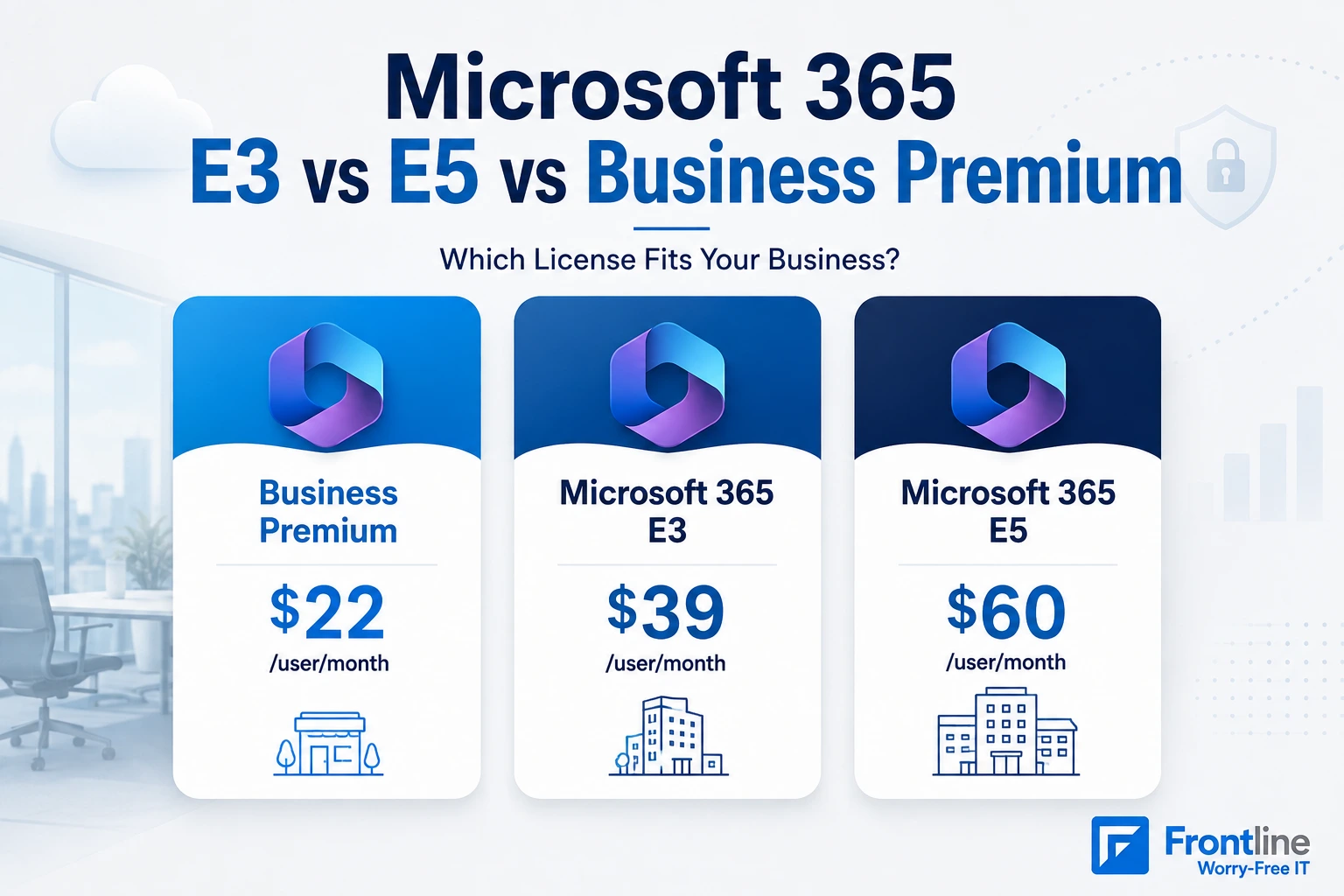
The best Microsoft 365 license is not the one with the highest per-user price. The right one depends on your environment’s needs: how many seats you’re licensing, which compliance requirements you must meet, and which add-ons you’d need to cover gaps that your “cheaper” plan left.
Microsoft 365 Business Premium, E3, and E5 all include Conditional Access, Intune, and some form of Defender protection now. On paper, they look nearly identical. In practice, they’re built for different businesses.
This article compares all three tiers, what’s included in each plan, the pricing, and how to choose the right license that actually fits your business.
Office 365 E3 vs. Microsoft 365 E3: What’s the Difference?
Before comparing tiers, it’s important to distinguish between Office 365 E3 and Microsoft 365 E3.
Office 365 E3 is the older enterprise SKU that doesn’t include Intune, Entra ID P1, or endpoint security. It includes just Office apps, Exchange, SharePoint, and Teams.
On the other hand, Microsoft 365 E3 adds Windows 11 Enterprise and a security/management layer on top: Entra ID P1, Intune, and Defender for Office 365 Plan, as of July 2026.
Most clients confuse these two because of their names, but if your invoice says “E3” and you’re not sure which one you’re on, it’s worth checking out.
What Each License Includes (and 2026 Prices)
All three include the Office desktop apps, Exchange email, Teams, SharePoint, and OneDrive. The differences are security, management, and scale:
| Feature | Business Premium | Microsoft 365 E3 | Microsoft 365 E5 |
|---|---|---|---|
| Price 2026 | $22 | $39 | $60 |
| Seat limit | 300 | Unlimited | Unlimited |
| Identity | Entra ID P1 (Conditional Access) | Entra ID P1 | Entra ID P2 (risk-based policies) |
| Device management | Intune | Intune | Intune + new endpoint privilege tools |
| Endpoint security | Defender for Business | Not included | Defender for Endpoint Plan 2 |
| Email/phishing protection | Defender for Office 365 P1 | Defender for Office 365 P1 (added July 2026) | Defender for Office 365 Plan 2 |
| Mailbox size | 100 GB | 100 GB | 100 GB |
| Windows license | Windows 11 Business | Windows 11 Enterprise | Windows 11 Enterprise |
| Compliance | Basic retention, DLP | Purview eDiscovery Standard, retention, DLP | Purview Premium (eDiscovery Premium, insider risk) |
| Extras | None | None | Power BI Pro, Teams Phone System, audio conferencing, Security Copilot agents |
Microsoft’s July 1, 2026 pricing update raised E3 from $36 to $39 and E5 from $57 to $60 while leaving Business Premium untouched at $22.
Business Premium mailboxes increased from 50 GB to 100 GB, removing a common reason to use E3 for users with large mailboxes. E3 also gained Defender for Office 365 Plan 1, closing another major gap with Business Premium.
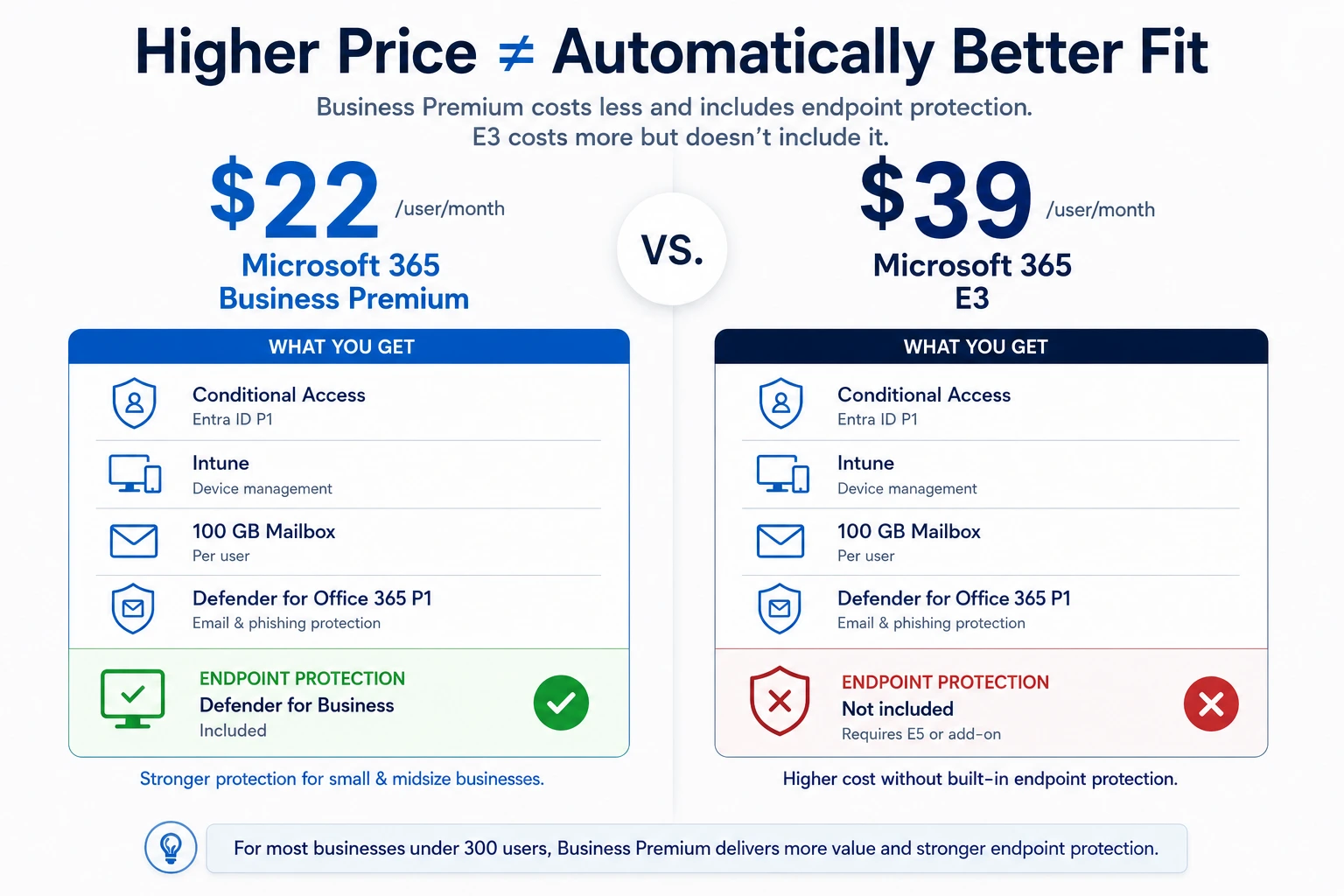
But E3 still lacks endpoint security. Business Premium costs $22 and includes Defender for Business to protect PCs, while E3 costs $39 and doesn’t. You need E5 or an add-on for that protection.
So for a small business, E3 can cost $17 more per user while providing less endpoint protection than Business Premium. Therefore, treat this table as a starting point, not as the final solution.
Microsoft 365 Business Premium vs. E3
For SMB, this is one of the most common licensing decisions. Business Premium and E3 both share many of the same core features, including Entra ID P1 (Conditional Access, MFA), Intune device management, Defender for Office 365 Plan 1 email security, the full Office desktop suite, and 100 GB mailboxes.
The real choice comes down to company size, compliance needs, and infrastructure.
What E3 adds that Business Premium doesn’t:
- No 300+-seat cap. E3 is the right choice once you reach or expect to exceed 300 users.
- Windows 11 Enterprise. Important for organizations that need advanced deployment options. Business Premium includes Windows 11 Business.
- Defender for Endpoint Plan 1. E3 includes Defender for Endpoint P1, while Business Premium includes Defender for Business. Despite both being EDR solutions, they are not the same product.
- Server CAL environment. E3 includes server CALs for hybrid on-premises infrastructure.
- Intune Plan 2, Remote Help, and Advanced Analytics. All of these are added to E3 in the July 2026 update.
What We Actually See Across Two Dozen Managed Tenants
Don’t choose the license based on comparison tables, which are only theory. Here’s a real-world license mix across roughly two dozen Microsoft 365 tenants Frontline manages for Los Angeles businesses, as of August 2026:
- Business Premium: 15 tenants, about 365 seats. This is the default answer, from a 91-seat entertainment venue to two-seat startups.
- E3 in its various forms: roughly 190 seats. Nearly all of it was either inherited from a previous IT provider, mandated by a multinational parent company’s enterprise agreement, or bought surgically for a handful of users.
We manage all three tiers daily, E3 and E5 tenants included. The right answer changes as a company grows, adds compliance obligations, or approaches the 300-seat line.
A Real-World Case Study: The E3 Problem – Higher Cost, Less Protection
A law firm that recently came to us from another provider is a clean example: 21 seats of classic Office 365 E3, billed at $31.20 per seat through their distribution channel. Business Premium (at $26.40 through the same channel) would cost less per seat and add Intune device management and Defender endpoint protection that their E3 licenses simply don’t have. Nobody had chosen E3; it was simply what the last provider set up, years ago, and the invoices kept coming.
Note: Business Premium is the right choice for organizations under 300 users without hybrid infrastructure requirements. E3 is the entry point when the seat cap is a real constraint, enterprise Windows licensing is required, or on-premises server CALs are needed. Not because it “sounds” more secure.
Microsoft 365 E3 vs. E5
E3 and E5 are both enterprise plans with no seat cap. The choice depends on the security depth, compliance automation, and whether analytics and voice are part of your strategy.
They both share similar core features: Defender for Office 365 Plan 1 was added to E3 in the July update, which removes what used to be a straightforward reason to upgrade to E5 for email security alone. Both now also include Intune Plan 1 and Plan 2, plus the same Office suite and mailbox size.
Three E5 features that can make the higher price worthwhile:
- Identity governance. E5 includes Entra ID P2, which adds risk-based Conditional Access, Privileged Identity Management (PIM), and Access Reviews.
- Endpoint and threat detection. E5 adds Defender for Endpoint Plan 2, Defender for Identity, Defender for Cloud Apps, and Defender for Office 365 Plan 2.
- Compliance automation. E5 adds Insider Risk Management, Communication Compliance, eDiscovery Premium, and Advanced Audit with longer retention.
Across the two dozen tenants we manage, exactly one client runs E5 – a government-funded workforce agency, and even they pay nonprofit rates. Nobody in our book of LA small and midsize businesses pays retail for E5. That’s not an argument against it; it’s a reminder that E5 is a serious platform that needs someone operating it. If your organization doesn’t have anyone whose job is to look at the alerts and dashboards E5 generates, you’re paying for instruments nobody reads.
Note: E3 covers most knowledge-worker teams without a specific regulatory mandate. E5 earns its roughly $21/user/month premium when you have a compliance requirement, a security team that needs unified investigation and response, identity risks only Entra ID P2 controls address, or you’re actively replacing third-party security tools with the Microsoft stack.
Microsoft 365 Business Premium vs. E5
This is the most sensitive comparison. E5 at $60/user/month is nearly triple Business Premium’s $22. The question isn’t whether E5 is more effective, but whether the specific capabilities justify the cost for a sub-300-seat organization.
They both include Intune for device management, Entra ID for identity, and Defender for email and endpoint protection. For many SMBs, this meets the basic cyber insurance requirements and covers the most common attacks, so it’s worth considering before jumping to the top tier.
- E5 adds Entra ID P2, the full Defender XDR stack, Purview’s advanced compliance suite, Power BI Pro, Teams Phone, and Security Copilot extras.
- Business Premium’s Defender for Business is prevention-focused.
Note: For organizations under 300 users, Business Premium is usually the best choice unless compliance, sensitive data, or identity risks require more. Before moving to E5, check whether add-ons can fill the gaps at a lower cost.
The Add-On Middle Path: Business Premium + Defender and Purview Suites
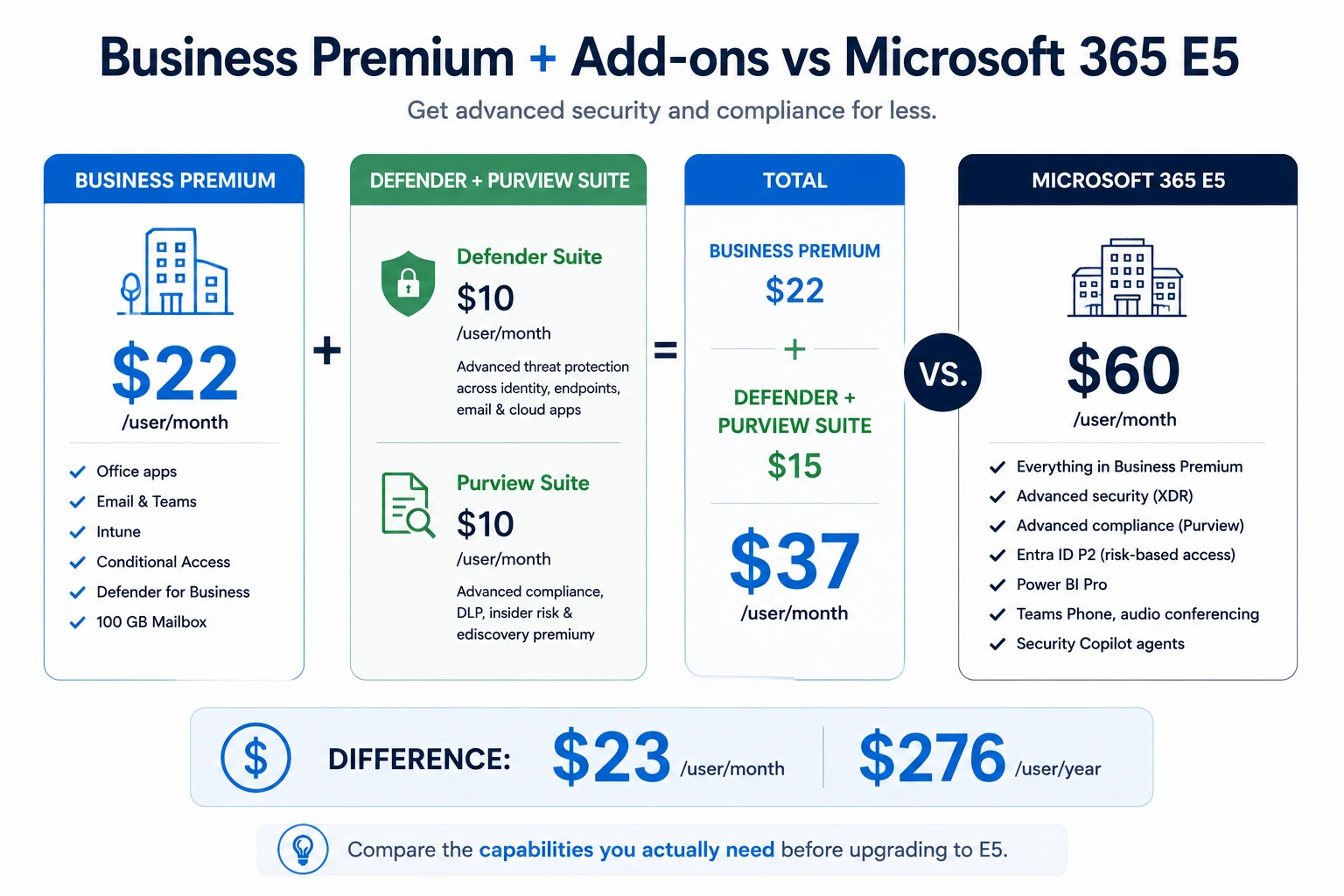
Microsoft sells add-on suites for Business Premium that close most of the gap to E5 at a fraction of the cost. And it’s usually the right answer for organizations under 300 users that need advanced security and compliance but not Power BI Pro, Teams Phone, or Security Copilot.
| Add-on | Price | Adds |
|---|---|---|
| Defender Suite | $10/user/month | Entra ID P2, Defender for Endpoint P2, Defender for Office 365 P2, Defender for Identity, Defender for Cloud Apps |
| Purview Suite | $10/user/month | Advanced DLP, Insider Risk Management, eDiscovery Premium, Customer Lockbox |
| Combined Defender + Purview | $15/user/month | Both of the above |
Business Premium ($22) + the combined suite ($15) = $37/user/month. E5 is $60/user/month. The add-on path saves $23/user/month – $276/user/year while delivering the core security and compliance capabilities of E5.
This is exactly the pattern behind two moves we’ve made for regulated clients rather than jumping to E-tier.
A federally regulated credit union we support met its examination requirements by moving from Business Standard to Business Premium, enforcing MFA and single sign-on, Intune device management, information protection, and advanced threat protection – all inside the Business Premium feature set, no add-on needed yet. An investment firm facing investor-mandated security standards took the same path: Standard to Premium, plus configuration, not a leap to E-tier. Regulators and auditors care about controls, including MFA, device management, data protection, and logging, not which SKU delivers them.
Note: If your organization also needs Power BI Pro, Teams Phone, audio conferencing, and Security Copilot alongside the security and compliance stack, the add-on path starts to approach E5 pricing, and the single-SKU simplicity of E5 becomes a real factor.
How to Choose the Right Microsoft 365 Plan
Start with what your environment needs and what you use today. The right license should match how you actually deploy and manage the platform.
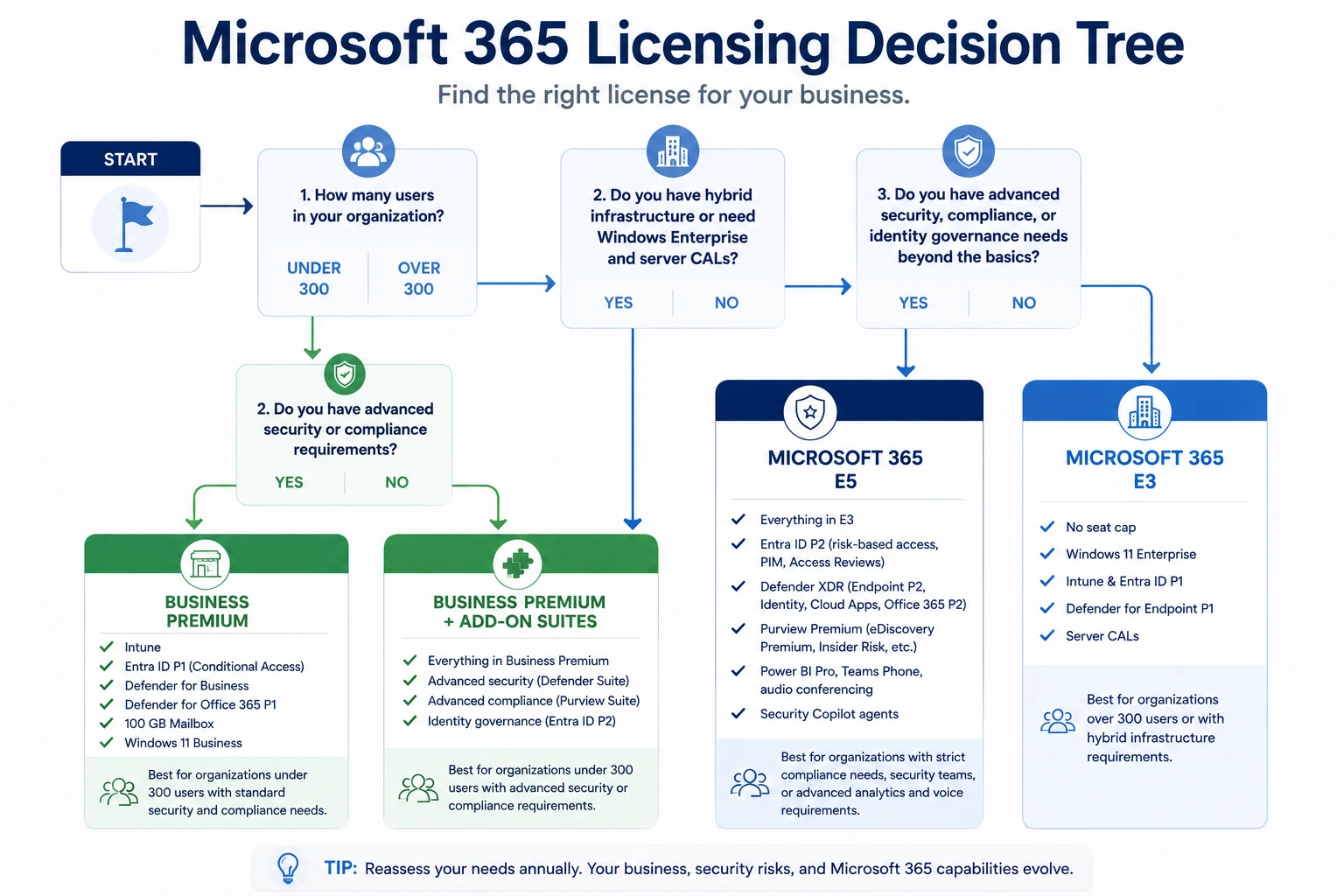
- How many users? Under 300 – Business Premium is viable. Over 300 – E3 or E5. Before adding either, benchmark your current Microsoft Secure Score against your security requirements.
- What are my compliance and regulatory requirements? No specific mandate – Business Premium or E3 baseline is enough. Active litigation risk or a regulated industry such as finance or healthcare – E5 compliance stack or Purview Suite add-on.
- What are my security operations needs? Prevention-focused, no dedicated SOC – Business Premium or E3. Detection, investigation, and response with a security team in place – E5’s Defender XDR stack or the Defender Suite add-on.
- Are analytics and voice part of the strategy? Power BI Pro and/or Teams Phone required natively – E5. Not required – the add-on path or a third-party tool.
Audit before you renew, not after. The most common licensing problem we find in assessments isn’t the wrong plan, it’s no choice at all.
A business changes IT providers, and the licenses just carry over. In one licensing review this year, we found 25 E3 seats purchased but never assigned to a human being: roughly 18% of that client’s E3 spend doing nothing at all, month after month – conference-room accounts, departed employees never offboarded, seats bought for a project that ended.
The July 2026 update added Intune Plan 2, Remote Help, and Advanced Analytics to E3. If you’re paying for those separately, remove that cost at renewal. Business Premium mailboxes now hit 100 GB. If you moved to E3 solely for mailbox storage, that reason no longer holds.
Licensing Is Only Part of Microsoft 365 Security
Choosing the right SKU matters, but licensing alone does not secure a tenant. Conditional Access, MFA, Intune, Defender policies, device compliance, and account cleanup still need to be configured and monitored. Frontline’s managed cybersecurity services help businesses operate those controls after the licenses are in place.
If you are moving from another email platform, consolidating tenants, or changing Microsoft 365 environments, review the licensing decision alongside your Microsoft 365 migration plan so users, security policies, and data are configured correctly from the start.
Frequently Asked Questions
Is E3 more expensive than Business Premium?
Yes. Microsoft 365 E3 costs $39/user/month versus Business Premium’s $22/user/month – a $17/user/month gap. That extra cost doesn’t automatically buy more protection: E3 doesn’t include endpoint security (Defender for Business), which Business Premium has natively, so for many under-300-seat organizations the cheaper plan is actually the more protective one.
What is the difference between Office 365 E3 and Business Standard?
Office 365 E3 ($26/user/month) is an enterprise-tier SKU built around Office apps, Exchange Online Plan 2, SharePoint, and Teams – no Intune, no Entra ID P1, no endpoint security. Business Standard ($14/user/month) covers similar ground at the SMB tier: Office apps and email, with minimal built-in security, and it’s capped like the rest of the Business-tier plans. Most SMBs under the seat cap get more value from Business Standard, or Business Premium if security is a requirement, than from Office 365 E3.
Is E5 better than E3 for small businesses?
Usually not. E5’s extra $21/user/month over E3 only pays off if someone is actively using its security and compliance tooling day-to-day. Otherwise, you’re paying for alerts nobody reads. For most small businesses, E3 or Business Premium plus the Defender or Purview add-on suites delivers more value than jumping straight to E5.
What is the difference between O365 E5 and M365 E5?
Office 365 E5 focuses on productivity, collaboration, and advanced Office 365 services. Microsoft 365 E5 includes everything in Office 365 E5, plus Windows 11 Enterprise, Intune, Entra ID P2, and Microsoft’s advanced security and compliance tools. As of July 2026, the price of Office 365 E3 increased from $23 to $26 per user per month.
Can you mix license types in one tenant?
Yes, and you should. A properly licensed tenant runs Business Premium for staff, Business Basic or F3 for light users, and an E-tier license or add-on only for the specific users who need it.
Get a Licensing Review Before Your Next Renewal
Most businesses we assess are paying for at least one license nobody chose on purpose: an inherited E3 estate, unassigned seats, or a tier mismatched to how the company actually works. Frontline runs Microsoft 365 licensing reviews for Los Angeles businesses as part of our Microsoft 365 Migration Services and free security assessment: what you’re paying, what you’re actually using, what the right mix costs, and what your renewal date makes possible.
Book a 30-minute consultation or call (310) 400-6996. Bring your license count; we’ll bring the math.
FT
About the author