
Meet Marcus. He manages operations at a 42-person marketing agency in Burbank. He also happens to be the person who resets passwords, troubleshoots printer errors, and got a call at 11 p.m. last October when the file server went down before a client deadline. Marcus is not an IT person. He just ended up being the one who deals with IT.
If that sounds familiar, you are not alone. Most small businesses in Los Angeles do not have a dedicated IT team. They make do with whoever is willing to figure it out. That works until it does not. This post gives you a clear framework to decide whether outsourcing IT support is the right move for your business, what it actually costs in LA, and what the process looks like.
What Does Outsourcing IT Support Actually Mean?
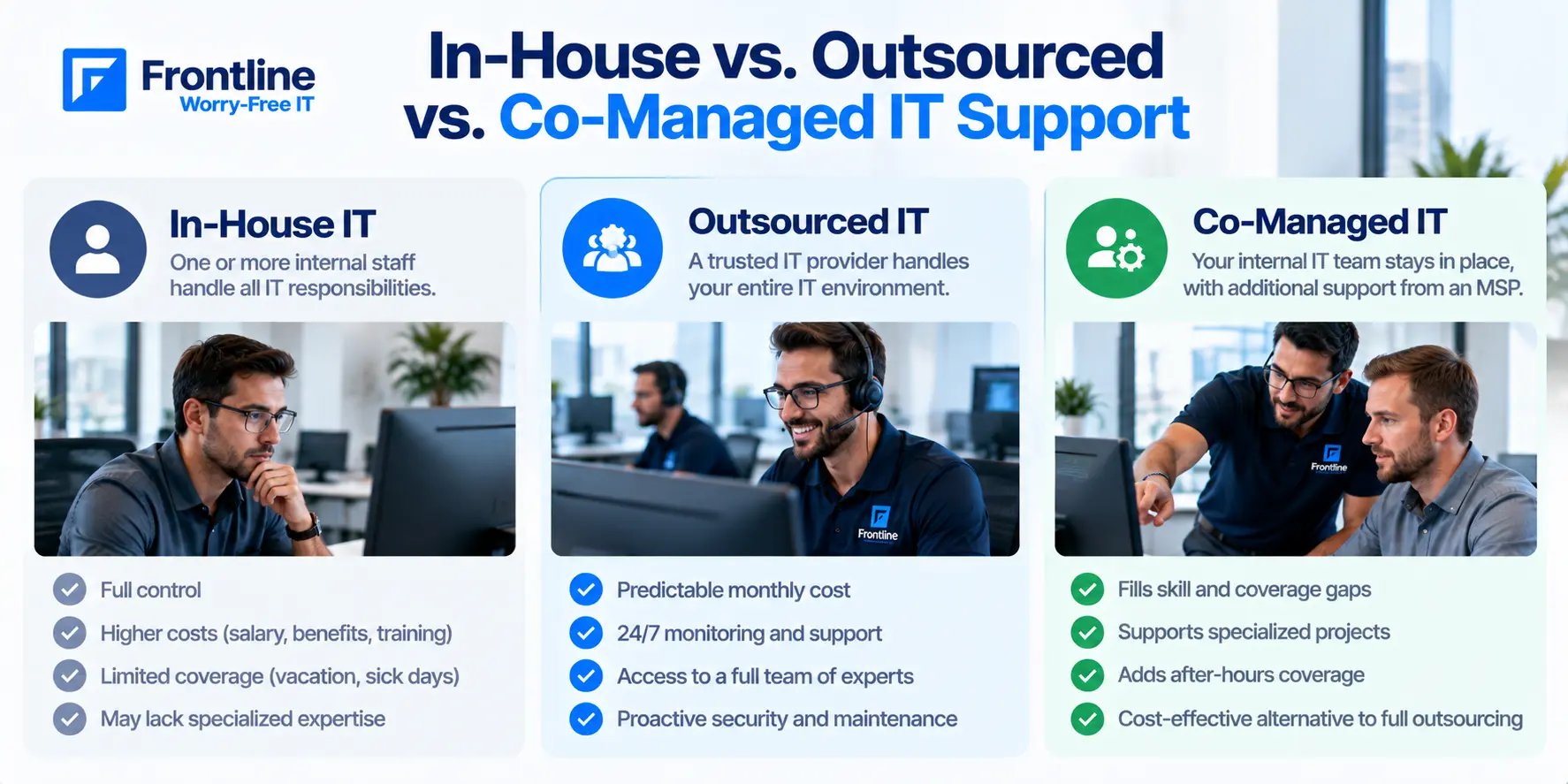
Before getting into the signs, it helps to be clear on what outsourcing IT actually means. There are three distinct models, and they are not interchangeable.
Fully managed IT (MSP model). You pay a flat monthly fee to a managed service provider. They handle everything: helpdesk, monitoring, backups, security, software updates, and network management. You have no internal IT staff to worry about.
Break-fix / reactive support. You call a technician when something breaks and pay by the hour. No proactive monitoring, no ongoing relationship. This is the cheapest option on paper and the most expensive when problems pile up.
Co-managed IT. Your internal IT person stays in their role, but an MSP fills the gaps: after-hours coverage, specialized skills like cybersecurity, cloud management, or compliance work that one person cannot cover alone.
Most LA businesses with 10 to 150 employees end up in the fully managed or co-managed model. This post covers both.
How Much Does Outsourced IT Support Cost in Los Angeles?
IT support pricing in LA runs higher than national averages. That is not a surprise given the labor market and cost of doing business here. Here is what to expect across the three models.
| IT Support Model | LA Typical Range | Best For |
|---|---|---|
| Managed IT Services | $125 to $200/user/month | Businesses that want predictable, ongoing support |
| Co-Managed IT | $50 to $150/user/month | Companies with internal IT who need extra coverage |
| Break-Fix / Hourly | $125 to $250/hr (1.5hr minimum) | Businesses under 10 employees with occasional needs |
| Internal IT Hire (LA) | $108,000+/year base salary | Comparison point, before benefits and overhead |
To put that in dollar terms: a 30-person company at $125 to $200 per user pays $3,750 to $6,000 a month. That is roughly what one experienced IT hire costs in salary alone, before you factor in benefits, payroll taxes, and paid time off.
| Company Size | Monthly Cost per User | What’s Typically Included |
|---|---|---|
| 1 to 25 employees | $125 to $200 | Remote helpdesk, basic patching, antivirus, 24/7 monitoring |
| 25 to 75 employees | $125 to $200 | Proactive monitoring, email security, cloud backup, endpoint management |
| 75+ employees | $125 to $185 | Full infrastructure management, compliance reporting, 24/7 NOC |
One more factor to account for: if your business operates in a regulated industry like healthcare, legal, or finance, expect to pay 15 to 30 percent more. Compliance requirements like HIPAA, PCI DSS, and CMMC add real scope to what an MSP needs to provide and document.
For a full breakdown by service model and business size, see our IT Support Cost in Los Angeles: Pricing Guide 2026.
10 Signs It’s Time to Outsource Your IT Support
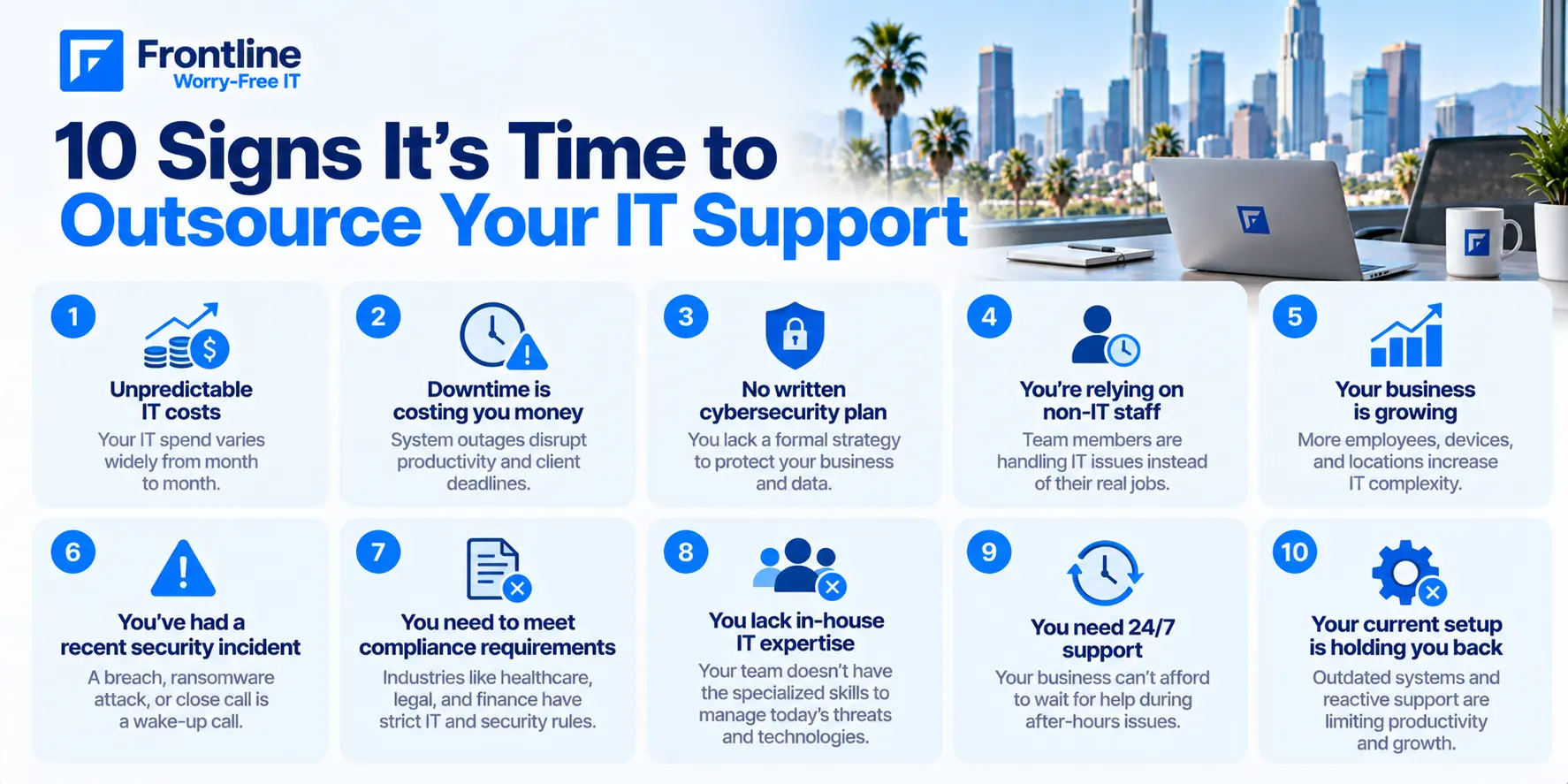
These signs do not all have to apply at once. If three or more describe your business, that is a strong signal. If five or more do, you are already past the point where waiting makes sense.
1. Your IT Costs Are Unpredictable Month to Month
One month you pay nothing. The next, an emergency server repair costs $4,000. Break-fix billing creates budget problems because you cannot plan for it. When IT spend is unpredictable, it competes with other priorities at exactly the wrong moment. A flat per-user monthly rate removes that variable entirely and turns IT into a line item you can plan around.
2. Downtime Is Costing You Real Money, but You Are Not Tracking It
Most small businesses do not measure downtime costs because nobody has the time to. But the math is straightforward: if your team cannot work for three hours because the network is down, multiply your hourly payroll by three. Unplanned downtime at larger organizations can cost upward of $10,000 per minute. At your scale the number is smaller, but the impact on client relationships and deadlines can be just as serious. Proactive monitoring catches problems before they become outages.
3. You Do Not Have a Written Cybersecurity Policy
If someone asked your team today what to do after clicking a suspicious email link, what would they say? Most small businesses have no formal procedure in place. That gap is one of the most common entry points for ransomware and phishing attacks. An MSP provides baseline security policies, endpoint protection, and active monitoring that a part-time or generalist IT person typically cannot provide on their own.
4. Your Team Waits on IT Instead of IT Supporting Your Team
When employees submit tickets and hear nothing for hours, or work around broken tools because nobody has time to fix them, IT has become a bottleneck rather than a support system. The productivity cost is real but rarely measured. Managed IT sets defined response time targets in writing, so your team knows what to expect and can hold the provider accountable when those targets are missed.
5. You Have Had a Data Loss or Security Scare in the Past 12 Months
A near-miss is a warning. If someone on your team clicked a phishing link, if a device was lost or stolen, or if data was accidentally deleted without a reliable backup to restore from, the conditions that allowed it are still in place. Most businesses that experience a significant breach had clear warning signs in the 12 months before it happened. An MSP with active monitoring and endpoint management closes those gaps before they turn into incidents.
6. You Are Growing and IT Cannot Keep Pace
Adding five employees sounds simple. In practice, it means new laptops, new accounts, new software licenses, more network load, and onboarding that takes time to do properly. If IT setup delays new hires or slows their first weeks on the job, that lag has a cost. Managed IT scales with your headcount on a per-user model. When you bring on new staff, coverage extends automatically without additional setup on your end.
7. Compliance Is Becoming a Real Concern
If your business handles client health records, payment card data, legal documents, or federal contracts, you have regulatory obligations. HIPAA, PCI DSS, and CMMC each require specific controls, documentation, and audit trails that most generalist IT setups do not provide. Non-compliance carries financial penalties and, in some cases, personal liability for leadership. An MSP with experience in your industry knows what those requirements look like in practice, not just in theory. See how Frontline supports IT management for law firms.
8. Your Current IT Person Is One Resignation Away from Disaster
When all your IT knowledge lives in one person’s head, that person becomes your single point of failure. If they leave, who sets up new employee accounts? Who knows the network configuration? Who holds the admin credentials? This is not a criticism of that person. It is a structural risk. Managed IT documents everything and keeps institutional knowledge inside systems and processes, not inside individuals.
9. You Have Remote or Hybrid Employees Without Centralized IT Management
Remote work does not manage itself from an IT perspective. Employees on home networks, personal devices, and unmanaged connections are exposure points that most break-fix arrangements simply ignore. Without centralized endpoint management, you have limited visibility into what is happening on devices outside the office. An MSP provides the toolset to manage remote employees securely and handle their IT issues without requiring them to come in for every problem.
10. You Spend More Time Managing Your IT Vendor Than Running Your Business
Break-fix relationships require management. You have to call when something breaks, follow up on quotes, wait for scheduling, and check whether the work was actually done correctly. If you find yourself spending hours a month on IT logistics, that time has a cost attached to it. A managed IT relationship changes this entirely: one point of contact, a defined scope of work, and a provider that is accountable for outcomes rather than hours billed.
What About Your In-House IT Staff? Do You Have to Let Them Go?
This is the question that stops most outsourcing conversations before they get started. The short answer: no.
If you have an internal IT person, outsourcing does not have to mean replacing them. Co-managed IT is specifically built for this situation. Your IT person shifts from handling helpdesk tickets and routine patching to managing projects, vendor relationships, and strategic decisions. The MSP handles the volume work: tier-1 tickets, overnight monitoring, after-hours coverage, and specialized tasks like security assessments or compliance documentation.
One person cannot realistically provide 24/7 coverage, maintain up-to-date cybersecurity expertise, handle all day-to-day tickets, and manage infrastructure projects at the same time. Something always gets deprioritized. In most cases, it is security. Co-managed IT fills those gaps without eliminating the position.
For more on how that model works in practice, see Frontline’s managed IT solutions.
Common Mistakes Businesses Make When Outsourcing IT
If you are ready to move forward, here are the mistakes worth knowing about before you sign anything.
Choosing based on price alone. The cheapest MSP is often the one with the thinnest SLA, slowest response times, and least experienced technicians. Price is one input. The contract terms are what actually protect you when something goes wrong.
Not defining SLAs upfront. “Fast response” is not a service level agreement. A real SLA specifies response time by priority level, distinguishes response time from resolution time, and spells out what happens when targets are missed. Before signing anything, review Frontline’s IT support services.
Outsourcing before documenting existing systems. If your current IT environment is undocumented, handing it to an MSP creates a messy onboarding that delays results. A basic audit before you start, covering hardware inventory, software licenses, and who holds admin credentials, makes the transition significantly smoother.
Failing to communicate the change to staff. Employees resist new tools and workflows without context. A brief message from leadership explaining what is changing, who to contact, and what to expect removes most of that friction. Your MSP should help you draft it.
Not vetting for industry experience. An MSP that has never worked in a law firm does not know HIPAA workflows. An MSP without experience in federal contracting does not know CMMC. Ask specifically about clients in your industry before committing.
How to Choose the Right IT Support Partner in Los Angeles
Once you have decided to move forward, here is a checklist for evaluating providers.
Local presence and on-site capability. Can they send a technician to your office when needed? What is the typical on-site response time? Is on-site support included in the contract or billed separately?
Written SLAs with response time by priority. Ask to see the SLA document before any sales conversation goes further. If they cannot produce one, that tells you what you need to know.
Proactive vs. reactive model. Are they monitoring your systems around the clock, or do they wait for your call? A reactive MSP is a more expensive version of break-fix with a monthly retainer attached to it.
Industry experience. Especially relevant if you operate in a regulated space. Ask for client references in your industry, not just general case studies.
References from businesses your size. An MSP that serves large enterprise clients and solo operators may not be the right fit for a 50-person professional services firm. Ask for references from businesses with similar headcount and operational complexity.
Frontline works with businesses across Los Angeles in legal, healthcare, professional services, and financial sectors, with defined response time guarantees and on-site support included. Book a free assessment to see whether it is the right fit for your environment.
What to Expect in the First 90 Days
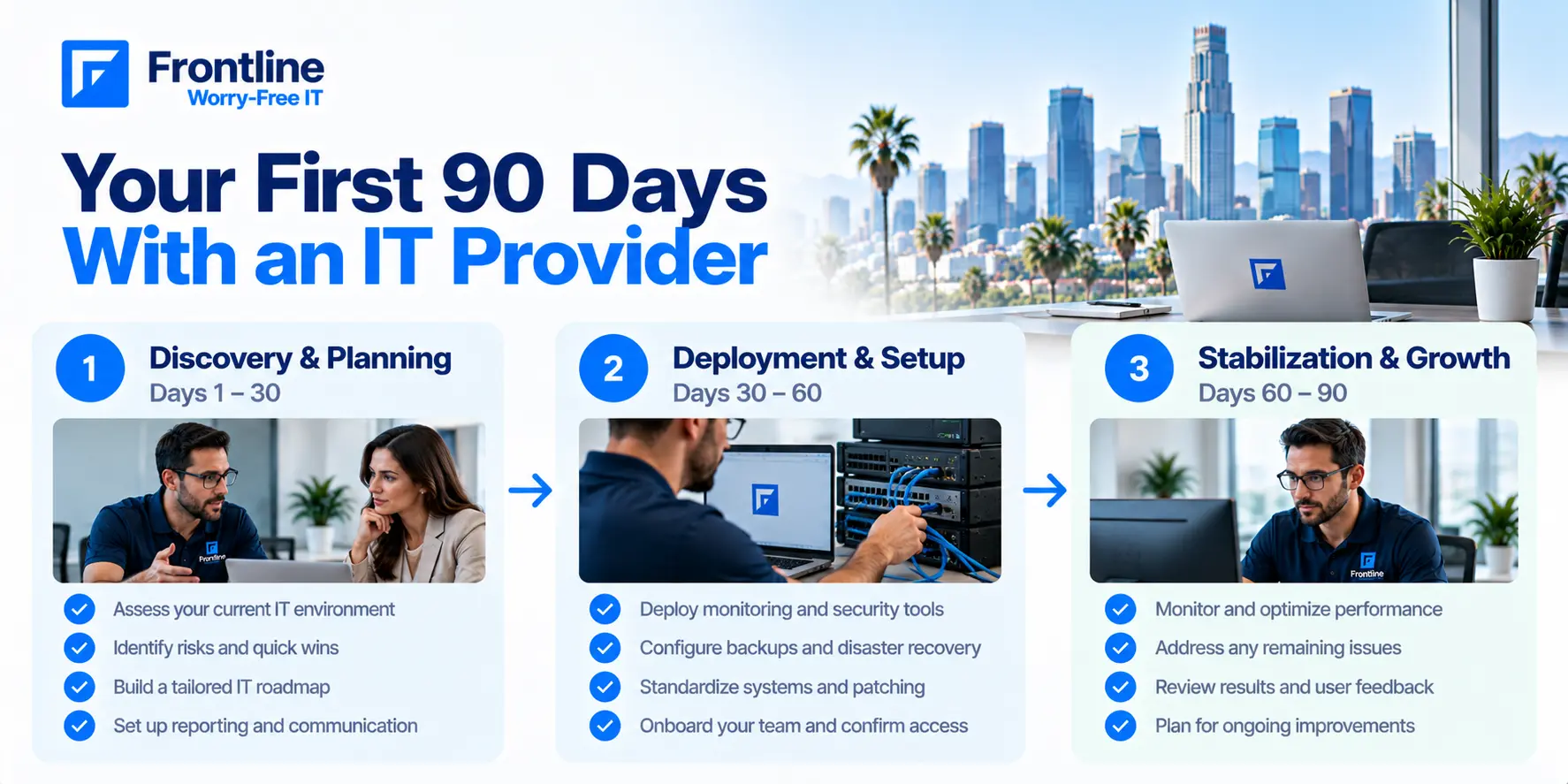
The first 90 days with a managed IT provider follow a consistent pattern. Knowing what to expect makes the transition easier to manage internally.
Days 1 to 30 — Discovery. The MSP audits your existing environment. Hardware, software licenses, network configuration, security posture, backup status, and user accounts are all documented. This is the foundation everything else builds on.
Days 30 to 60 — Setup and deployment. Monitoring tools are deployed to all endpoints, backup systems are verified and tested, security configurations are applied, and your team is onboarded to the new helpdesk process.
Days 60 to 90 — Stabilization. Tickets are being handled on SLA, monitoring is active, and the MSP has a clear picture of your environment. A review call at the end of this period identifies any remaining gaps and sets priorities for the next quarter.
Most businesses see measurable improvement in ticket response times and overall system stability within the first 60 days.
Is Outsourcing IT Right for Every Business?
Not always. An honest answer here is worth more than a pitch.
If your business has fewer than 10 employees, a very simple IT environment, and low data sensitivity, break-fix support may be sufficient. The economics of a per-user managed IT contract do not always work at that scale.
If you are above 25 users, operate in a regulated industry, have remote employees, or have had any kind of security incident in the past year, managed IT is almost always the better option. The risk exposure and operational drag of unmanaged IT typically outweigh the cost at that size.
If you are not sure which category your business falls into, a free assessment from an MSP gives you a clear picture of your current environment and risk posture before you make any commitments.
Frequently Asked Questions
What’s the difference between managed IT and break-fix support?
Managed IT is a flat monthly service that includes proactive monitoring, helpdesk, security, and system maintenance. Break-fix is reactive: you pay hourly when something fails. Managed IT costs more per month but is almost always less expensive over time because it prevents the costly emergencies that break-fix arrangements tend to generate.
How long does it take to switch IT providers?
A standard MSP onboarding takes 30 to 60 days. The first month is mostly discovery and documentation. Helpdesk coverage typically begins within the first two weeks, so your team is not left without support during the transition.
Can I outsource IT if I already have an IT person on staff?
Yes. The co-managed IT model is built for this. Your internal person handles strategic work, projects, and vendor management. The MSP handles volume tickets, after-hours coverage, and specialized tasks. Most businesses find their internal IT person becomes more effective in this arrangement, not redundant.
What is a typical response time guarantee for an MSP in Los Angeles?
Standard SLAs distinguish priority levels. Critical issues, such as a full outage or active security incident, typically carry a one-hour response target. High-priority issues, like a single-user outage, usually run two to four hours. Non-critical issues run four to eight hours. Get these commitments in writing before signing.
Do I need to outsource all IT functions, or just some?
You can outsource selectively. Some businesses use an MSP only for cybersecurity monitoring while managing everything else internally. Others outsource the full scope. Co-managed IT lets you define exactly which functions the MSP covers and which stay in-house, based on where the gaps actually are.
Ready to Outsource IT Support?
Talk to Frontline about managed and co-managed IT support for your Los Angeles business.
FT
About the author