
An IT support contract checklist is not just another document to review before signing. It helps you verify that the agreement clearly defines responsibilities, service levels, costs, and ongoing support for your business. Without it, you risk unexpected charges, productivity loss, costly disruptions, and security vulnerabilities.
If you are evaluating a contract with an MSP or IT vendor, use this MSP contract checklist to review what a contract should include, red flags to watch for, specific questions to ask, and evidence to request before signing.
IT Support Contract Checklist: A Quick Overview
| Area | What It Should Answer | Evidence to Request | Red Flag |
|---|---|---|---|
| Scope | What’s covered and what isn’t? | Service list, exclusions | “General IT support” with no detail |
| Exclusions | What will cost extra? | Exclusions list, out-of-scope rates | Key services excluded without clear pricing |
| SLA | How fast will issues be handled? | Response times, priorities, escalation process | “Prompt” support with no targets |
| Security & Access | Who can access your systems and data? | Access controls, security policies, backup details | Unrestricted access or vague security terms |
| Pricing | What’s included, and what costs extra? | Pricing, rates, billing terms | Hidden or undefined extra charges |
| Legal & Exit | How do you terminate and hand over systems? | Notice, liability, data-return terms | Long lock-ins or no exit process |
1. Define the Scope

The scope is one of the most important parts of an IT support agreement because it defines exactly what you’re paying the provider to manage and support. It should clearly list every person, device, site, cloud tenant, application, and other system involved.
Check whether the contract answers:
- Are employees, contractors, remote workers, and seasonal staff included?
- Does the contract cover laptops, desktops, mobile devices, printers, and other peripherals?
- Are network equipment, firewalls, Wi-Fi, and meeting-room systems included?
- Does it include Microsoft 365 or Google Workspace administration?
- Does it include vendor coordination and third-party support?
- Does it cover both on-site and remote support?
- Who is responsible for maintaining each system and how often is it reviewed?
Besides what’s covered, the contract should explicitly list what is out of scope.
Ask the provider to label these potential exclusions:
- Major projects or migrations
- New-office deployments
- On-site travel outside a defined area
- After-hours work
- Hardware procurement
- Cloud consumption charges
This exclusion list will protect both parties.
Finally, check what happens when your business changes. If you add 20 employees, open another office, or acquire another company, the contract should explain how the supported environment and monthly fee change.
If the IT provider promises “fully, ongoing IT support”, without clearly defining what that includes, consider it a red flag.
2. Check Response Time, Resolution Time, and Priority
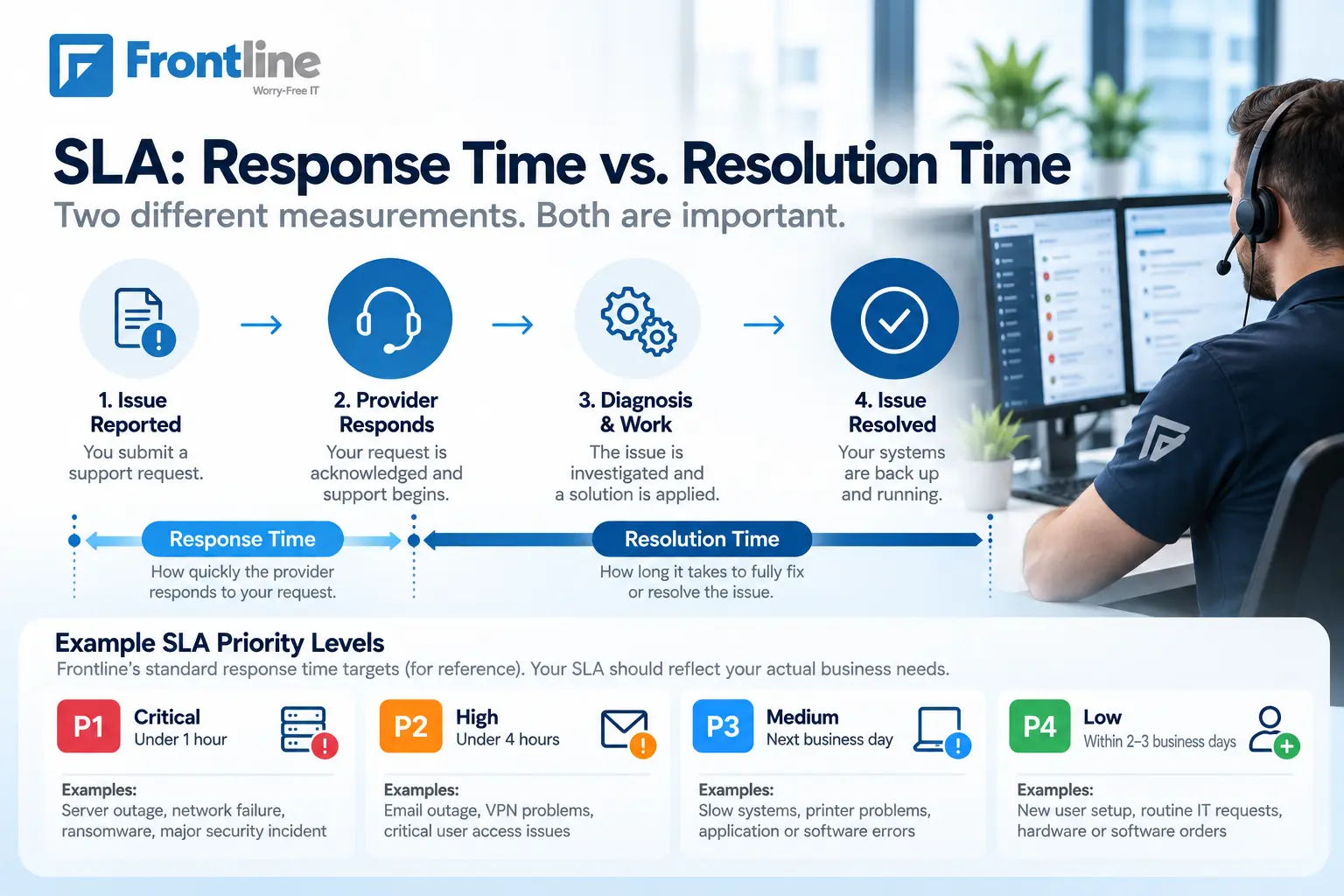
Response time is how fast the IT provider responds to a problem. Resolution time is how long it takes to fix or resolve the problem.
A provider needs to respond to an issue in a timely manner, while the resolution depends on the diagnosis, access, suppliers, and the issue itself. Take a look at your SLA (Service Level Agreement) in the MSP contract.
It should cover:
- Response targets for each priority level
- Resolution targets, where appropriate
- Escalation procedures
- After-hours and emergency support procedures
For example, Frontline’s standard response time targets are organized by priority level:
| Priority Level | Response Time | Examples |
|---|---|---|
| Critical (P1) | Under 1 hour | Server outage, complete network failure, ransomware or major security incident |
| High (P2) | Under 4 hours | Email outage, VPN problems, critical user access issues |
| Medium (P3) | Next business day | Slow systems, printer problems, application or software errors |
| Low (P4) | Within 2–3 business days | New user setup, routine IT requests, hardware or software orders |
These are not standards. Your SLA should reflect your actual business requirements and what the provider can realistically deliver. The important point is that each priority should have:
- A business-impact definition
- A response target
- A resolution target, where appropriate
- An update frequency
- An escalation trigger
These commitments define what the provider promises to the client, but they don’t necessarily explain how the provider’s internal teams coordinate to meet them. Understanding the difference between an SLA and OLA can help you see how external service commitments connect to internal operational responsibilities.
3. Support Hours and Availability
Make sure the contract clearly defines “24/7” support.
For example, an IT provider may offer 24/7 automated monitoring support, which is not the same as a 24/7 staffed help desk.
Frontline offers remote support first; on-site support is available only if needed. The contract should clearly distinguish between these types of coverage.
Check whether the contract specifies:
- Time zone
- Standard support hours
- Weekend and holiday coverage
- Emergency support
- After-hours responsibilities and pricing
- On-site support (and what’s included)
4. Access, Patching, and Monitoring
The security responsibilities must be clearly assigned in the contract, not assumed.
For example, the IT contract should specify who is responsible for patching, endpoint protection, user administration, license renewal, backup checks, restore tests, certificate renewal, domain and DNS control, network changes, and other covered tasks.
Ask them:
- Does each technician use an individual account?
- Is MFA required for privileged access?
- Are administrator actions logged?
- How often is provider access reviewed?
- How quickly is access removed when a technician leaves?
- Who owns the primary administrator accounts?
Clear ownership is easier to maintain when your provider keeps accurate IT documentation covering administrator access, system configurations, network details, and recovery procedures.
The MSP contract should also include what gets patched and how frequently. It should specify:
- Which systems are monitored?
- What alerts trigger action?
- During what hours?
- Who receives the alert?
- What happens after an alert?
- Are investigations documented?
This establishes baseline security measures and controls.
5. Backup, Recovery, and Restore
A backup and recovery plan and strategy helps protect your business from data loss, system failures, cyberattacks, or other disruptions.
Make sure your MSP contract defines:
- What systems and data are protected?
- How frequently are backups performed (daily, weekly)?
- How long are they retained?
- Where are they stored (on-site or cloud)?
- Are backups encrypted?
- Who can access them?
- Are copies stored separately from production systems?
- What happens if a backup fails?
- RPO (Recovery Point Objective): how much data the business can tolerate and RTO (Recovery Time Objective): how long the system can stay unavailable before the issue is solved
The contract should specify how often restore tests occur and what evidence you receive. For critical systems, this should be more often, but the appropriate frequency depends on the business.
6. Pricing, Hidden Costs, and Change Control
The pricing section should include:
- Charging unit: per user, device, site, or another measure
- Minimum commitment
- Setup or onboarding fees
- Price-review mechanism
- Price-increase limits or process
- Taxes
- Payment terms
- Cancellation charges
Also, the contract should include the fee for out-of-scope services, including:
- Emergency or after-hours support
- On-site travel
- Project work
- Hardware procurement
- Software licensing
- Specialist incident response
New offices, new devices, more users, and other supported systems can affect pricing, so the contract should address this too.
7. Data Protection and Compliance
Because an IT provider may have access to your systems, accounts, networks, and business data, the contract should clearly define its security and data-protection responsibilities.
Check whether the contract includes:
- Cybersecurity services
- Cybersecurity employee training
- Compliance protection (HIPAA, SOC 2, or CCPA)
- Regular vulnerability monitoring
Don’t rely on generic statements like “comply with local requirements”. Ask the provider to clearly answer:
- Which data protection laws and regulations apply to the services?
- Where will our data be stored and processed?
- What security measures must the provider maintain to protect our data?
- Who can access our data, and how is that access controlled and monitored?
- How are cyberattacks handled?
- What happens to our data when the contract ends?
8. Exit, Termination, and Data Handover

Before you sign, read the IT contract termination and exit clauses carefully. Check for:
- Initial contract term
- Renewal mechanism
- Automatic-renewal terms
- Notice period
- Early termination fees
- Suspension rights
- Transition assistance
A clear handover process should be included in the contract. If you ever need to switch IT providers without losing access to critical systems, the agreement should already establish:
- What the provider must return or transfer, such as business data, administrator credentials, system configurations, documentation, backups, and other relevant assets
- The timeframe for completing the handover
- Whether the transition assistance is included in the agreed fee or billed separately
9. Reporting and Performance Tracking
Reporting and performance monitoring should be part of the ongoing service.
The IT support contract can include reporting metrics such as:
- Recurring incidents
- Customer satisfaction
- SLA breaches
- Average time to resolution
To be sure, ask your IT provider for an IT support contract example and see whether if this part is covered.
Red Flags to Watch For

Watch for these statements that can be difficult to verify, including:
- Vague scope or verbal assurances – “We provide full IT support”, without listing users, systems, devices.
- No regular reporting – “We can send reports if you need them”, without saying in the contract what is reported or how often.
- Unclear security ownership – The contract says “security is managed by the provider”, instead of specifically mentioning who is responsible for different tasks.
- Promises that sound too good without documentation – “99.99% uptime” or “5-minute response time” during the sales process, but they are not mentioned in the contract.
- Unclear pricing – fixed price without explaining what’s included and what’s not included explicitly.
Questions to Ask Before Signing
- Exactly what systems, users, devices, and locations are covered?
- What is explicitly excluded, and what will those services cost?
- What are the response and resolution targets for each priority?
- When does the SLA clock pause, and how is that documented?
- Who is accountable for patching, backups, security, and recovery?
- Who owns the administrator accounts, domains, and cloud tenants?
- What charges can appear outside the monthly fee?
- What does the onboarding process include, and is there a documented IT onboarding checklist?
- What happens to our data, credentials, and documentation if we terminate?
- When must we give notice to avoid automatic renewal?
- What happens if the provider misses its SLA or causes a security incident?
- How is the handover process handled?
Choose an Experienced IT Support Provider
A strong IT support contract checklist protects you long before anything goes wrong. It puts both sides’ responsibilities in writing. If the provider can’t answer your questions, document its responsibilities, or uses phrases that sound too good to be true, these gaps can cost you much more later.
Before signing anything, review this checklist step by step. Ask for proof, not promises. Our IT support services are built around clearly defined response times, 24/7 helpdesk access, documented backup and security processes, and transparent pricing.
FAQs
Reviewing an IT Support Contract?
Frontline can help you review the scope, service levels, security responsibilities, pricing, and exit terms in your current or proposed IT support agreement.
Contact Frontline