
How much does business IT support cost in Los Angeles? Most small and mid-sized businesses in Los Angeles pay $100-$300 per user per month, but the price depends on the scope of the services, business size, compliance, and security requirements.
Before signing anything, it is important to understand what to expect in terms of pricing, what’s included, and what costs extra. This way, you can get a clearer picture of what to expect from different services and providers, which will help in the decision-making process.
In this blog, we will share real pricing models, compare costs for businesses of different sizes, and provide a quick checklist of what to look for before signing a contract. By understanding your options and what to look for, you can choose the right IT support for your business.
What IT Support Costs in Los Angeles: A Quick Overview
| IT Support Model | Los Angeles Typical Range | Best For |
|---|---|---|
| Managed IT Support | $125 – $250/user/month | Businesses that want predictable, ongoing IT support |
| Break-Fix IT Support | $125 – $225/hour | Small businesses with occasional IT issues or one-off needs |
| Co-Managed IT Support | $50-$150/user/month | Businesses with internal IT staff that need additional expertise, tools, or coverage |
Prices can vary based on company size, business score, compliance needs, and security requirements. IT support costs in LA can be higher because it is a competitive, high-demand market. So let’s look at what each model covers and which key factors influence pricing.
The 3 IT Support Models and What Each Costs
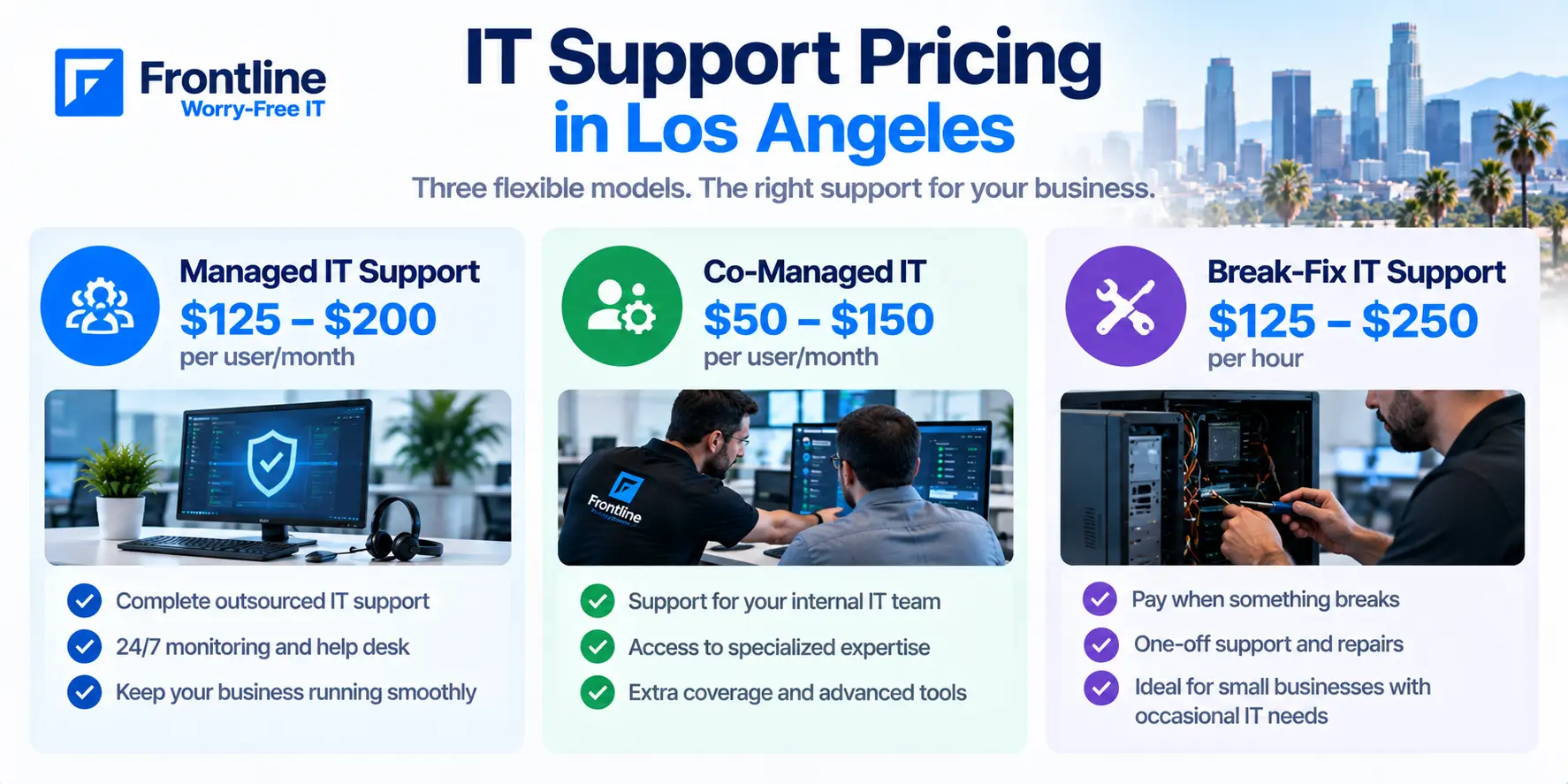
Before you speak with your next IT vendor, see how each pricing model works and what you are actually paying for.
Managed IT Services (Per User, Per Month)
Most businesses in LA use this model. You pay a flat monthly fee per user that covers:
24/7 IT support
Help desk
Monitoring
Backup data
Cybersecurity monitoring services
Cloud support
Network maintenance
You pay the provider whether issues occur or not. Managed IT services keep your business running smoothly instead of solving issues only when they occur.
This proactive approach helps you plan your budget more predictably and reduce downtime, which are the key advantages. You also don’t need to hire a full in-house team or burden your current IT staff. Choosing between managed IT vs in-house IT support depends on how much control, scalability, and internal expertise your business needs to operate effectively.
How much do managed IT services in LA cost?
$125 to $200/user/month, depending on the tier level
So for 30 employees at $125-$200 per user, you will pay $3,750 – $6,000 monthly.
Break-Fix IT Support (Per Hour or Per Incident)
The break-fix model is a pay-as-you-go model: an incident happens, the technician comes to fix it, and you pay only for that service. This may include:
A computer won’t turn on
Network goes down
A server stops working
Not receiving emails in Outlook
Cyberattack
Can’t access data
This is a reactive approach, where you call a technician only when something breaks and pay an hourly rate without having ongoing IT support or proactive monitoring.
How much does a break-fix model in LA cost?
$125 to $250/hour, with a minimum of 1.5 hours of work
Costs can be unpredictable, so typically the price ranges from $150 to $400 per incident, depending on the complexity of the issue.
The break-fix model is suitable for businesses with fewer than 10 employees and with very simple IT environments. But for businesses that rely heavily on ongoing IT support daily, the costs can go beyond the IT budget. The current savings can suddenly disappear if unplanned downtime occurs, increasing costs up to $10,000 per minute.
And not only that, frequent issues and downtime reduce productivity, which affects the overall business’s performance and efficiency.
Co-Managed IT Services (Per User, Per Month)
This is the hybrid model, where the MSP (managed IT provider) supports the existing internal IT team, rather than replacing it.
While the internal IT team handles day-to-day support, the MSP can support:
Cybersecurity monitoring
Cloud management
System upgrades
Migrations
Additional coverage like support during busy periods, after-hours coverage, weekend escalation, etc.
How much do co-managed IT services cost?
$50 and $150/user/month
They charge per user at their standard rate. Co-managed IT solutions don’t replace managed IT solutions. They usually help your internal IT team with tasks they don’t have the expertise or time to cover.
It works well for businesses with one to five internal IT employees that need extra support for specialized areas.
Managed IT Support Pricing Benchmarks by Company Size
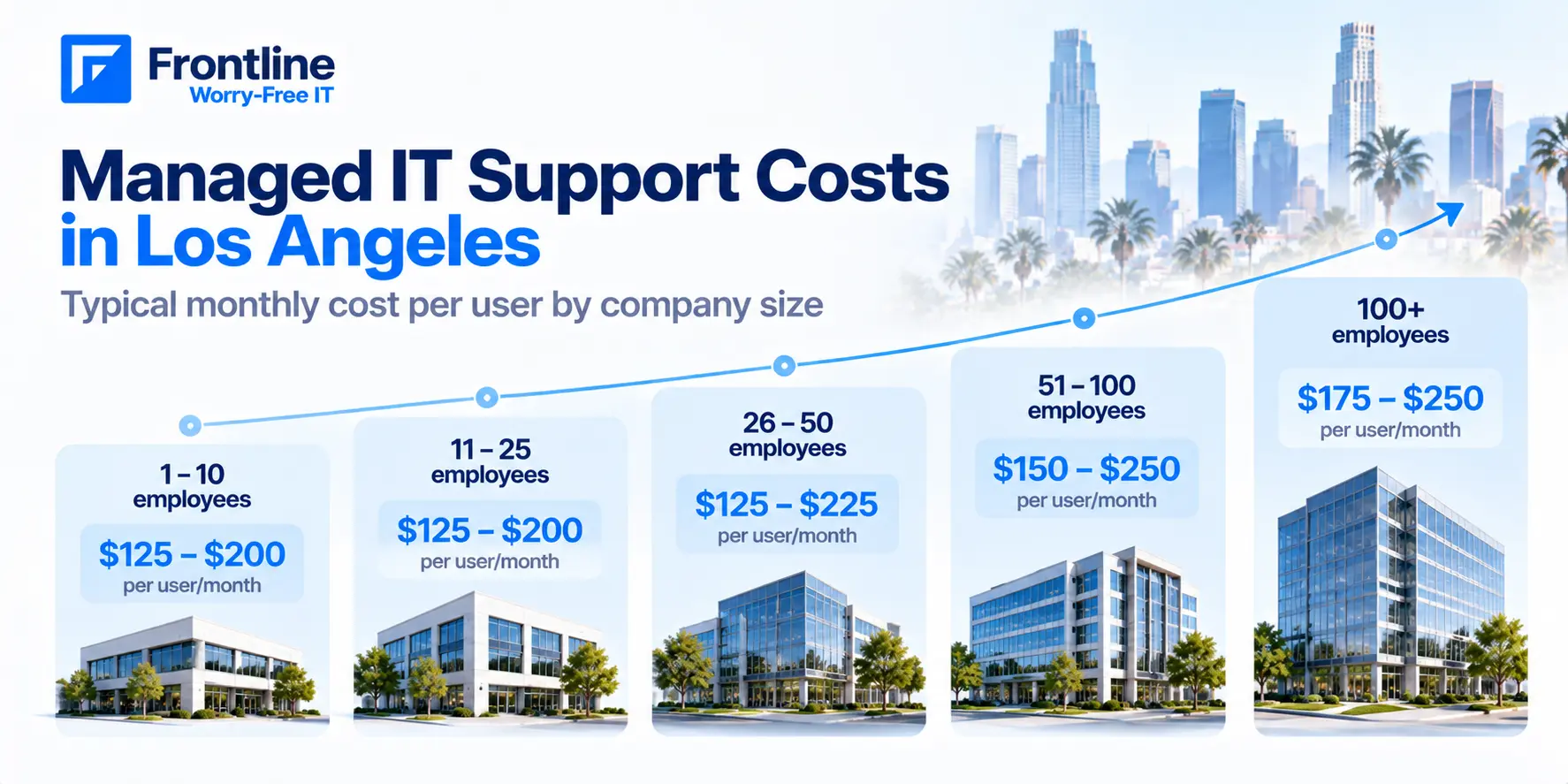
| Company Size | Monthly Cost per User | What’s Included |
|---|---|---|
| 1–25 employees | $125-$200 | Remote helpdesk, basic patching, antivirus, 24/7 monitoring |
| 25–75 employees | $125-$200 | Proactive monitoring, email security, cloud backup, endpoint management |
| 75+ employees | $125-$185 | Fully managed infrastructure, compliance reporting, 24/7 NOC |
If you consider an MSP, use this table as a starting point. Schedule a call with your provider and ask them for their prices based on your business scope and size.
Frontline customizes these prices upon discovery.
What Factors Affect the Price of IT Support
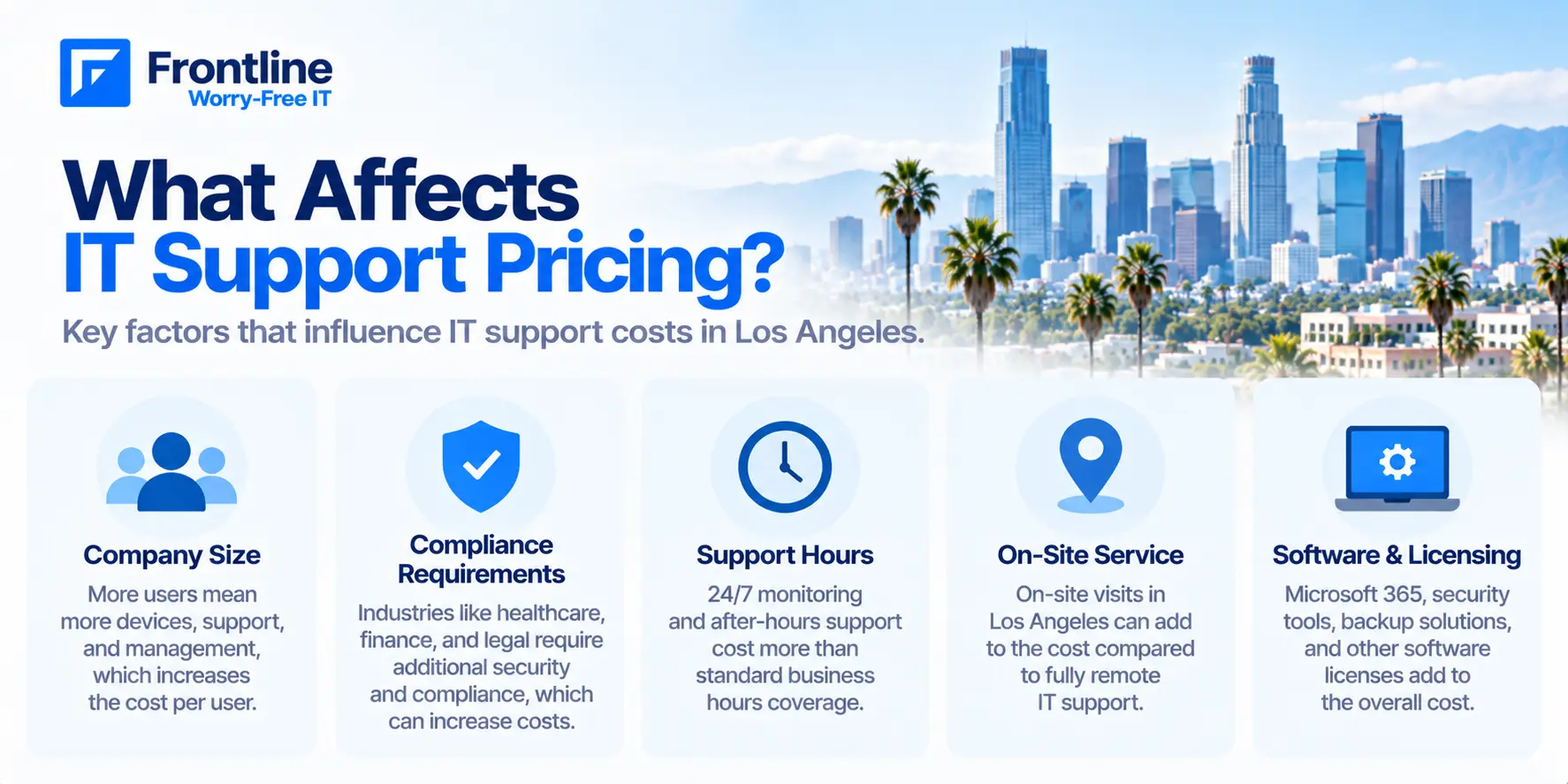
The following services usually are not included in the IT solutions and can cost extra:
Company size and devices – more users equals a lower per-user rate in most cases.
Compliance requirements – regulated industries such as finance, healthcare, or legal may add 15% to 30% more to the standard IT services pricing since they require additional security and compliance requirements such as HIPAA, CMMC, and PCI DSS.
Support hours and SLA tier – 24/7 coverage costs more than business-hours-only support. Make sure the SLA includes response time by priority level, uptime guarantees, escalation procedures, and solutions for missed targets. Check this IT support checklist before signing anything.
On-site vs remote support – on-site support may cost more than remote, since some issues, such as hardware failures, network issues, or new office setups, often require hands-on support.
Built-in vendor services – Microsoft 365 or other software licensing. Compare between Microsoft 365 plans in terms of pricing and take a look at what’s included to be aware of the additional costs.
MSP vs Break-Fix vs Internal IT: The Real Cost Comparison
There is no one-size-fits-all model. Choosing the right one depends on your current business size, needs, and risk tolerance.
| Factor | Managed IT (MSP) | Break-Fix | Internal IT Hire |
|---|---|---|---|
| Typical cost (LA) | $125-$200/user/month, depending on tier and provider | $125-$250/hour, often with a 1.5-hour minimum | $108,000+/year base salary, before benefits |
| Billing structure | Flat monthly fee, making costs more predictable | Pay per incident, making costs less predictable | Fixed salary regardless of ticket volume |
| Coverage hours | 24/7 available, depending on the plan | Typically business hours and response-time dependent | Typically business hours |
| Approach | Proactive, ongoing monitoring and management | Reactive, called when something breaks | Varies; often reactive due to capacity |
| Expertise depth | Access to specialists in security, cloud, networking, and compliance | Skill level varies depending on the technician’s expertise | Typically limited to the skills of the person hired |
| Scalability | Increase or adjust services as your business grows | Scales with the number of support calls | Requires hiring additional staff to scale |
| Predictability | High — fixed monthly costs | Low — costs can increase unexpectedly | Relatively high, but turnover, but turnover can increase costs |
| Time to onboard | Typically 30–60 days | Usually available when an issue occurs | Weeks to hire and months to fully ramp up |
What to Look for When Choosing an IT Support Provider in Los Angeles
SLA specifics in writing: “We respond fast” is marketing. A real SLA defines response time by priority level, distinguishes response time from resolution time, and mentions support hours. Ask for the SLA before signing anything.
Local vs remote coverage: Confirm whether the provider can send a technician to your location without unexpected fees. Ask how quickly they can reach your office.
Onboarding process and setup costs: Ask what the first 30 days look like. The provider should document your current environment before taking on support. Also, any setup fee should be disclosed upfront.
Exclusions: Ask the provider what’s not included in their IT support services, what the additional costs are for after-hours support, project work, add-ons, a new office, and a new employee before comparing two providers.
Always request a free assessment from two or three providers before committing.
Red Flags to Watch For in IT Support Pricing
Since not every IT support provider offers the same value, here are some warning signs to look for when comparing providers:
No transparent pricing on what’s included and what’s not included
Charging per hour for ongoing support
Limited help desk support
Unclear SLAs
On-site support billed separately
Charging for a consultation before you’re a client
Get an Accurate Quote for Your Los Angeles Business
Identify your service model based on your company size, business needs, IT infrastructure complexity, and IT support needs. The price in LA can change based on market demand or the specific scope of services. That’s why this is the average price estimation and should be used as a benchmark, not as a standard.
For example, our trusted IT support LA services are tailored to your business needs. Book a free consultation to get a customized pricing plan based on your current IT environment, budget, and needs.
FAQs
How much does IT support cost per hour in Los Angeles?
Most LA providers charge $125 to $250/hour for break-fix support, with a typical minimum of 1.5 hours. This model can become expensive when IT problems happen often.
How much does it cost to outsource IT support in Los Angeles?
Managed IT support services in LA cost $125 to $200/user/month, $50 and $150/user/month for co-managed IT support, and $125 to $250/hour for break-fix support. For example, for many businesses with 10-20 employees, the managed IT services can cost 30% to 50% less than hiring in-house teams. They also provide 24/7 coverage and specialized teams across cybersecurity, cloud, and compliance.
Which is the best model for SMBs in LA?
Since there is no size that fits all businesses, it depends on your budget, data protection, and capabilities. However, for small-sized businesses in LA, we recommend the flat-rate per-user-per-month model, since it is more cost-predictable and flexible in the long term.
Get a Custom IT Support Quote
Talk with Frontline about your Los Angeles business IT support needs.
FT
About the author