
If you think you have been hacked, start by looking for activity you did not authorize. The strongest warning signs include unfamiliar account logins, passwords or recovery details changing without your permission, unexpected transactions or messages, disabled security settings, and unknown devices connected to your accounts.
A slow computer or occasional pop-up does not automatically mean you have been hacked. The more important question is whether there is evidence that someone else has accessed or changed your accounts, device, or security settings.
This guide explains how to check if you have been hacked, which warning signs matter most, how to tell if someone may be accessing you right now, and what to do next.
Quick answer: how do you know if you have been hacked?
The clearest signs are unfamiliar login alerts, passwords that suddenly stop working, recovery details or multi-factor authentication settings changing, messages or transactions you did not make, security tools being disabled, unknown devices connected to your accounts, or programs moving without your input. One weak symptom alone, such as a slow computer, is not proof of a hack.
How to Check If You Have Been Hacked
If you are asking, “Have I been hacked?”, do not rely on one symptom. Check your accounts and device for evidence of unauthorized access.
- Review recent login activity: Look for sign-ins from devices, browsers, locations, or times you do not recognize.
- Check connected devices: Review phones, laptops, browsers, and sessions linked to your email, cloud, social, and business accounts.
- Check password and recovery settings: Confirm your password, recovery email, phone number, and multi-factor authentication settings have not changed.
- Review sent messages and email rules: Look for emails, messages, forwarding rules, filters, or auto-replies you did not create.
- Review financial activity: Check bank, credit card, payment app, and online account transactions for anything unfamiliar.
- Inspect installed programs and browser extensions: Look for software, remote-access tools, or extensions you do not remember installing.
- Check security settings: Confirm antivirus, firewall, updates, real-time protection, and other controls are still enabled.
- Review security alerts: Pay attention to password reset emails, MFA prompts, unusual sign-in alerts, or warnings about account changes you did not request.
The strongest evidence is not usually a slow computer. It is activity you did not perform, settings you did not change, devices you do not recognize, or access attempts you cannot explain.
8 Clear Signs You Have Been Hacked
What are the first signs of being hacked? The most reliable warning signs involve unauthorized access, account changes, or actions you did not perform yourself.
1. You See Logins or Devices You Do Not Recognize
Unexpected sign-ins from unfamiliar devices, browsers, locations, or IP addresses are among the strongest signs that someone may have accessed your account. Review recent login history and terminate sessions you do not recognize.

2. Your Password Suddenly Stops Working
If a password stops working and you did not change it, an attacker may have changed the credentials and locked you out. Check your recovery email, phone number, active sessions, and recent account activity immediately.
3. Your Recovery Details or MFA Settings Changed
Changes to your recovery email, phone number, backup codes, security questions, or multi-factor authentication settings are a major warning sign. Attackers often change recovery options after gaining access so the legitimate owner cannot easily take the account back.
4. Messages, Emails, Posts, or Transactions Appear That You Did Not Make
Sent emails, social posts, purchases, bank withdrawals, credit card charges, or payment activity that you do not recognize can indicate unauthorized account access. Even small test transactions may be used to check whether stolen payment details still work.

5. Antivirus, Firewall, or Security Settings Are Disabled
Hackers and malware may disable antivirus software, firewalls, updates, or real-time protection to remain hidden. Security controls that change without your permission should be treated as urgent.

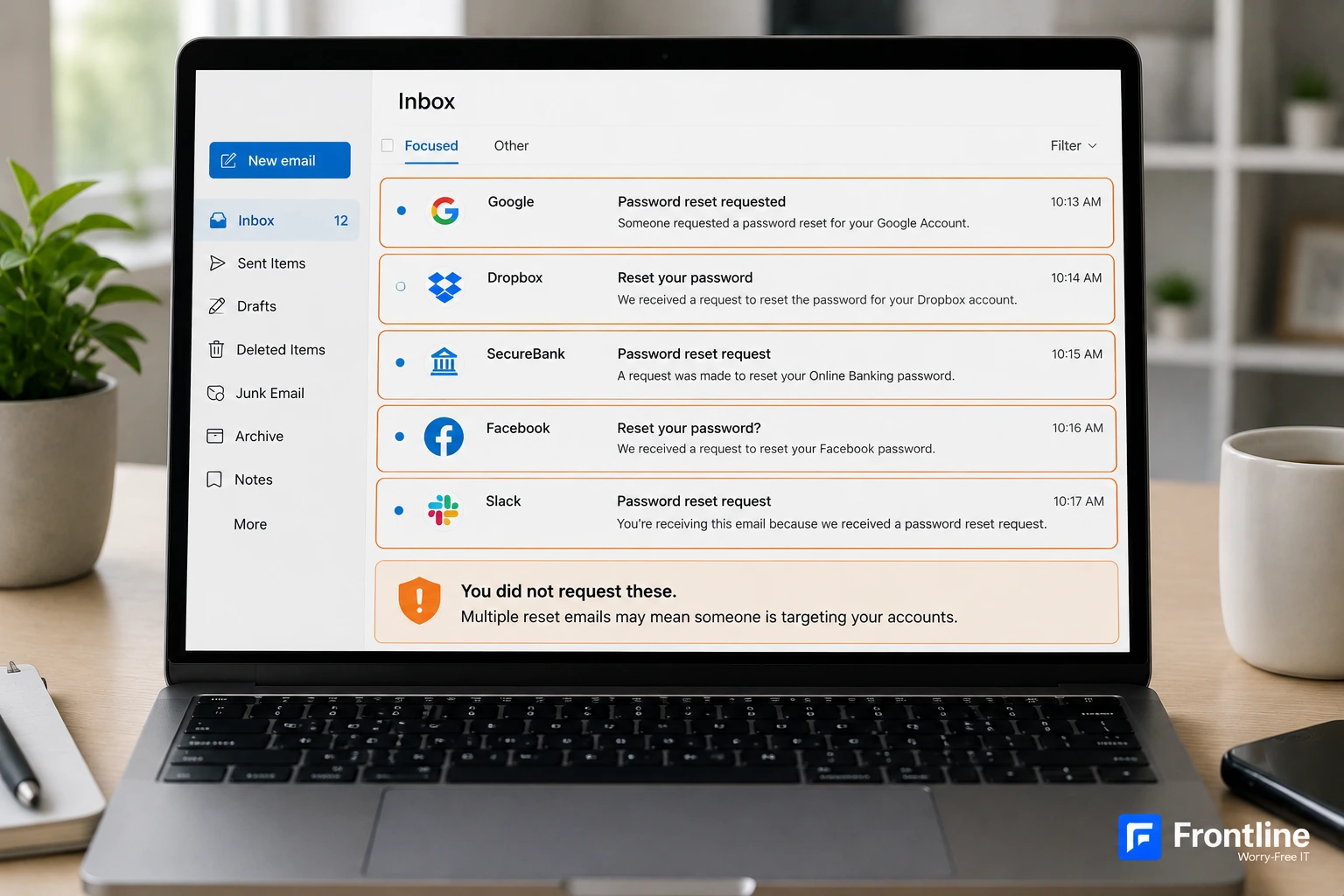
6. You Receive Password Reset or MFA Requests You Did Not Make
Repeated password reset emails or multi-factor authentication prompts can mean someone is attempting to access your account. If the requests continue, review your recent sign-ins and secure the account from a trusted device.
7. Programs or the Mouse Move Without Your Input
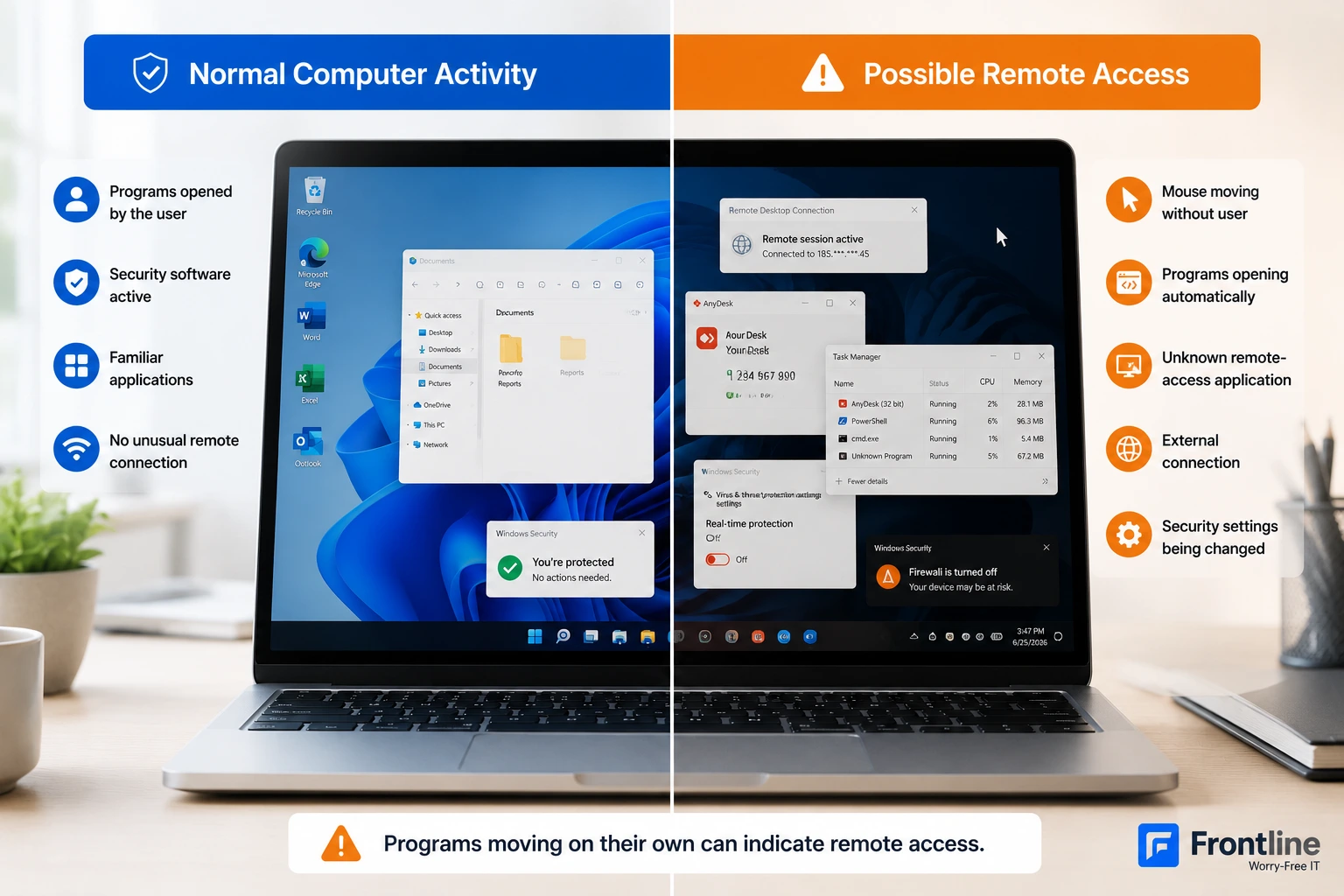
Programs that open, close, or move without your input can indicate unauthorized remote access. If you see active control you cannot explain, disconnect the device from the internet or company network and contact your IT or security provider.
8. Your Device Suddenly Shows Unusual Pop-Ups, Redirects, or Performance Problems
Persistent pop-ups, browser redirects, unexplained slowdowns, overheating, crashes, or unfamiliar applications can be signs of malware. These symptoms are weaker evidence on their own, because they can also be caused by normal software or hardware problems. Treat them more seriously when they appear together with unauthorized account or security changes.
How to Know If You Are Being Hacked Right Now
If you are worried that someone is actively accessing your account or computer right now, look for real-time changes rather than general performance problems.
- Your mouse moves or windows open without your input.
- You receive login alerts while you are using the account.
- MFA prompts appear repeatedly when you are not signing in.
- Your password or recovery information changes while you are still logged in.
- Security software is disabled unexpectedly.
- Files are renamed, encrypted, deleted, or created without explanation.
- You see an unfamiliar remote-access application or active session.
Is Your Account Hacked or Is Your Device Hacked?
A hacked account and a hacked device can produce different warning signs. Knowing the difference helps you decide what to check first.
| Possible Account Compromise | Possible Device Compromise |
|---|---|
| Unknown login or connected device | Unknown programs or remote-access tools |
| Password stops working | Mouse or programs move without input |
| Recovery details changed | Security software disabled |
| Messages or transactions you did not make | Persistent redirects, pop-ups, or unexplained processes |
| Unexpected MFA or reset requests | Files changed, encrypted, or deleted without explanation |
What to Do Immediately If You Think You Have Been Hacked
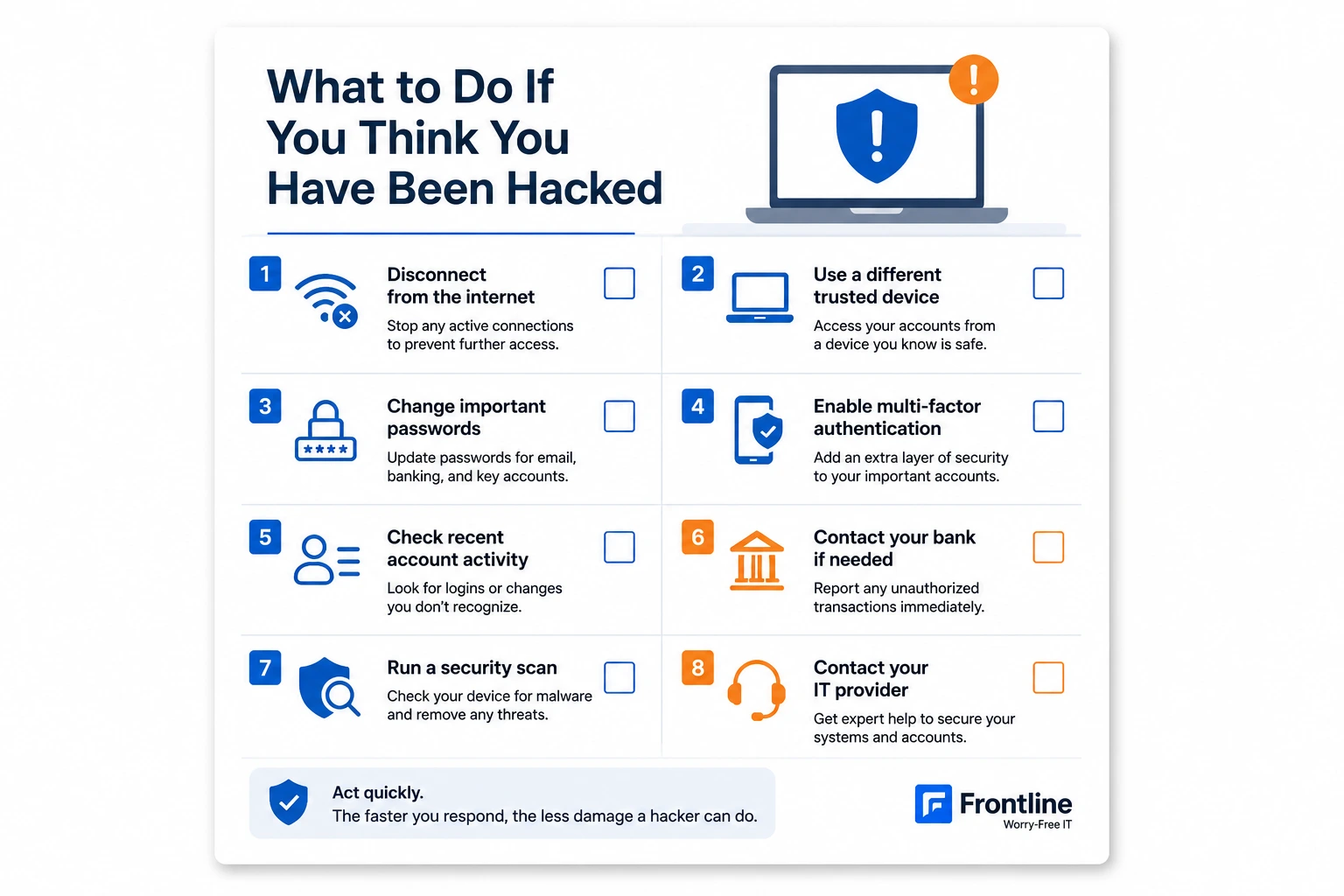
If you find evidence of unauthorized access, act quickly. Do not wait to see whether the problem disappears.
- Disconnect the affected device from the internet or company network if you suspect active compromise.
- Use a different, trusted device to change important passwords.
- Sign out of other sessions and remove unfamiliar connected devices.
- Enable multi-factor authentication and regenerate recovery codes where possible.
- Document unusual alerts, transactions, messages, login locations, and account changes.
- Contact your bank, IT provider, or security team when financial or business systems are involved.
- Run a full security scan, but do not assume antivirus alone confirms the device is clean. Businesses should also understand why antivirus isn't enough for business security, because modern attacks can involve stolen sessions, remote-access tools, identity compromise, and activity that a basic scan may not explain.
How to Recover Your Accounts and Device
How Could You Have Been Hacked?
Once you identify suspicious activity, the next question is often how the attacker got access. In many cases, the initial entry point is a stolen password, deceptive message, malicious file, exposed session, or outdated software.

What Happens After a Hacker Gets Access?
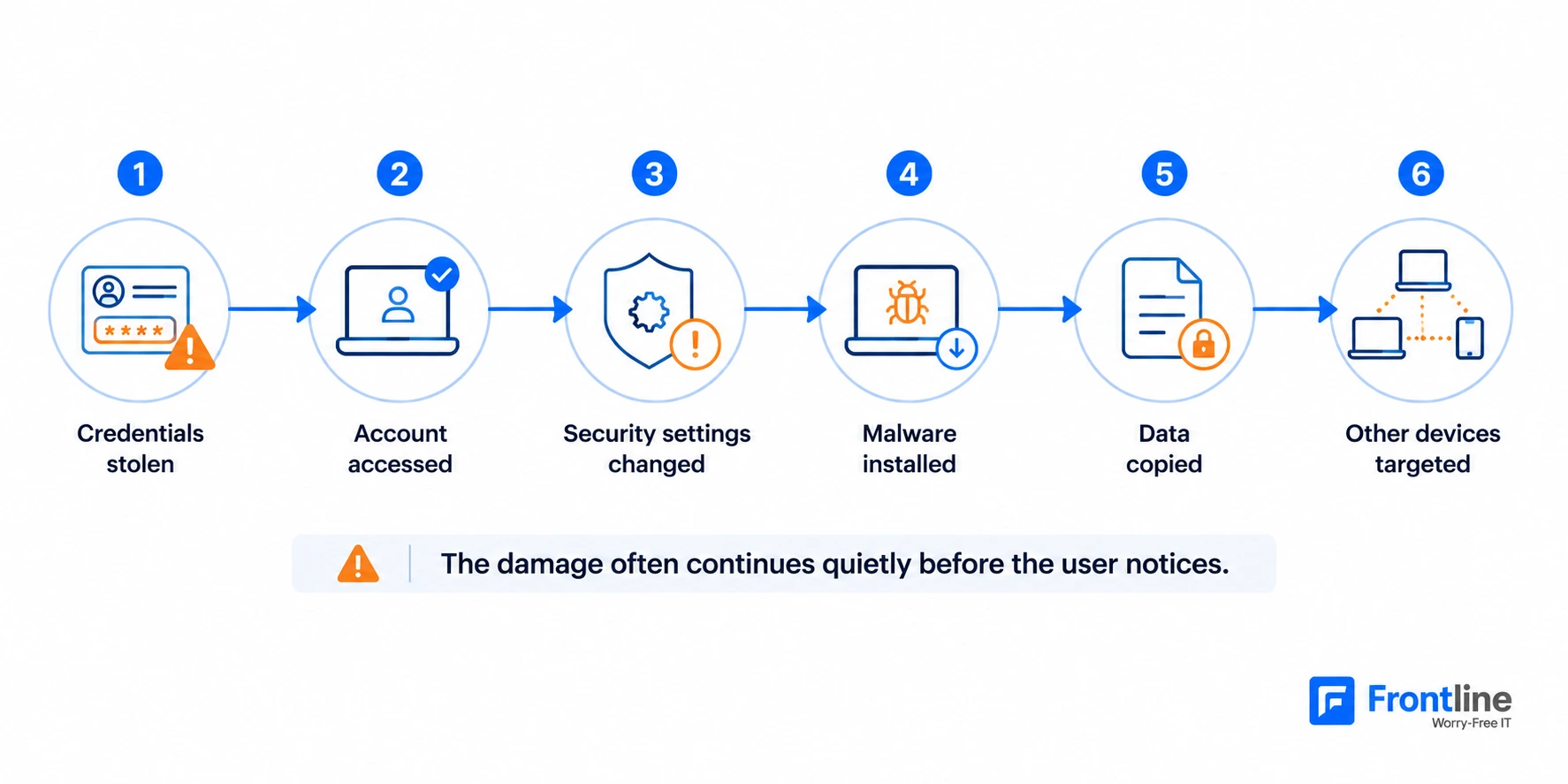
Once a hacker gets into a computer or account, they may stay quiet while they gather information and expand access. What hackers look for depends on the target, but common goals include credentials, financial data, business files, administrator privileges, backups, and access to connected systems.
- Accessing personal, business, or financial information
- Stealing usernames and passwords
- Installing malware or ransomware
- Monitoring online activity and communications
- Using the compromised device or account to reach other systems
How Managed IT Companies Respond to Hacker Attacks
Managed IT and security teams follow a structured process to stop the active threat, preserve evidence, restore systems safely, and reduce the chance of the same attack happening again.
- Detect suspicious activity: Review alerts, logs, account behavior, endpoint activity, and network traffic.
- Isolate affected systems: Remove compromised devices from the network to reduce lateral movement.
- Lock compromised accounts: Reset credentials, revoke sessions, and restrict unauthorized access.
- Investigate logs: Determine how access occurred and which systems or accounts were affected.
- Remove the threat: Eliminate malicious software, persistence mechanisms, unauthorized tools, and exposed access paths.
- Restore clean systems: Recover from verified backups and validate integrity before reconnecting.
- Monitor for repeated activity: Watch for reinfection, stolen sessions, related account attempts, or new unauthorized changes.

This is where managed cybersecurity services add value. Continuous monitoring and incident response provide context that a single antivirus scan cannot.
How to Protect Yourself From Being Hacked Again
Should You Be Worried If You Get Hacked?
You should take the incident seriously, but the level of risk depends on what was accessed. A single failed login attempt is different from an attacker changing credentials, accessing financial accounts, controlling a device, or reaching business systems. If sensitive data, multiple accounts, company infrastructure, or financial information are involved, professional incident response may be necessary.
Conclusion
The best way to tell if you have been hacked is to look for evidence of activity you did not authorize. Unknown logins, changed passwords or recovery settings, unfamiliar transactions, disabled security controls, repeated MFA prompts, and active remote control are much stronger indicators than a slow computer alone.
If you find signs of unauthorized access, secure the affected accounts, isolate compromised devices when necessary, preserve evidence, and get help when business systems or sensitive information are involved. Frontline provides professional cybersecurity services, real-time monitoring, rapid incident response, and proactive protection for businesses that need more than basic antivirus.
Think Your Business May Have Been Hacked?
Frontline can help review suspicious activity, identify security gaps, and explain the next steps for containment and recovery.
Book a 30-minute consultation