Every year, small businesses become targets of cybercriminals, facing ransomware, phishing, data breaches, and other cyber threats. While there are cybersecurity articles that warn you about these threats, they do not tell you what is actually happening inside networks and what our monitoring tools track month after month across real client environments.
Here is the reality: the most dangerous threats are not always the obvious ones. They are the ones that quietly blend into everyday network activity and can go unnoticed for weeks.
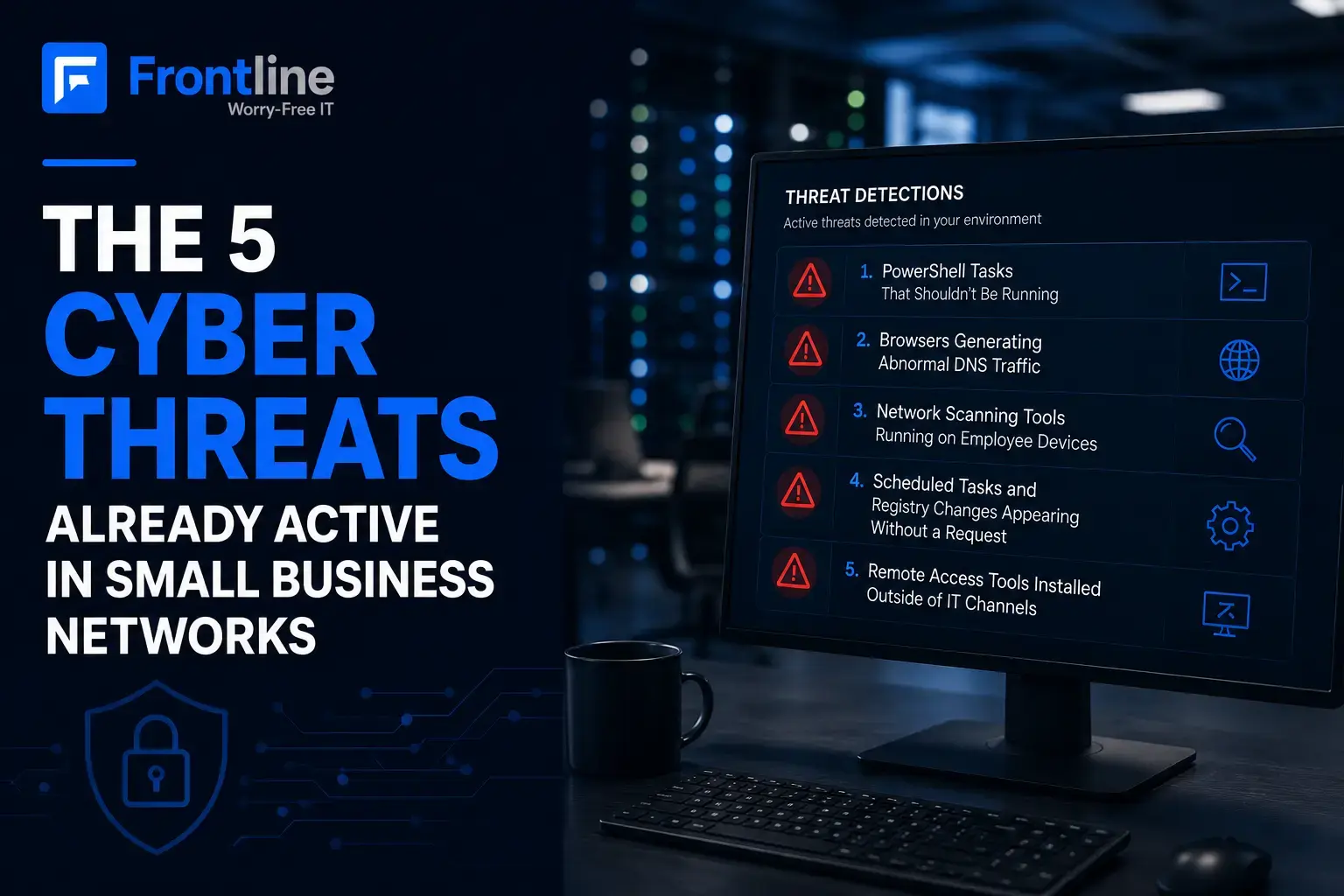
These are the five common signs of cyberattacks in small businesses we see most often.
1. PowerShell Tasks That Shouldn’t Be Running
PowerShell is a built-in Windows tool that IT teams use to automate administrative tasks. It is powerful, trusted by the operating system, and built into virtually every Windows device your business owns, which is exactly why attackers love it.
When an attacker gains access to a device, whether through a phishing email, a compromised password, or an exposed remote desktop port, PowerShell is often the next tool they use. It can download additional malicious code, create new user accounts, disable security controls, and spread across the network while appearing normal. If you notice any of these activities, they may be signs your business has been hacked.
From Our Monitoring Data
PowerShell-related alerts, such as connection anomalies and rule violations, are among the highest-volume signals across our client environments, with more than 620 alerts in the past 180 days. These do not trigger antivirus because PowerShell is a legitimate tool doing what it was built to do.
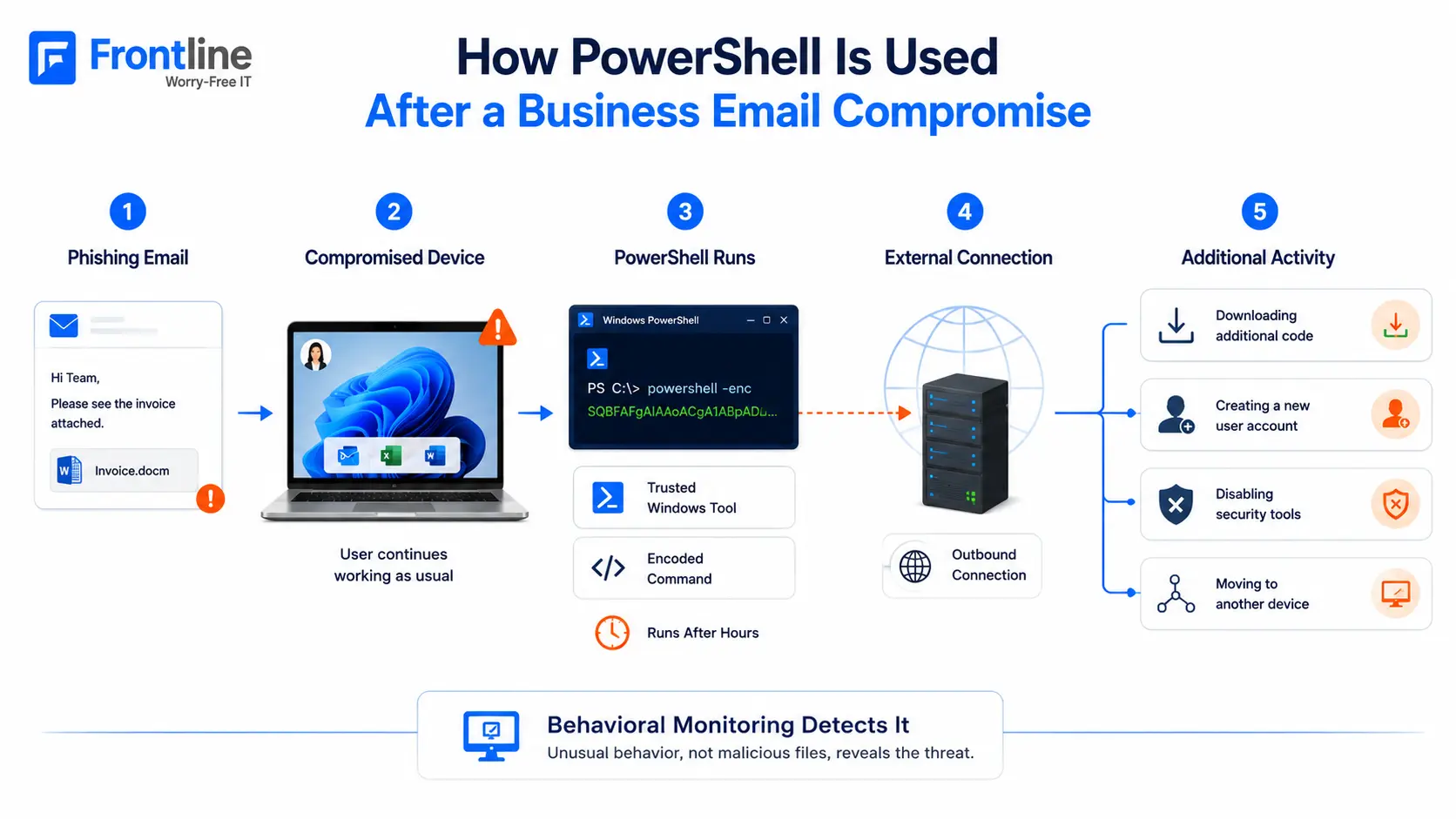
What to watch for:
- PowerShell running at unusual hours
- Outbound connections to unfamiliar addresses
- Commands using encoded parameters to hide what is really happening
Why traditional security misses it: Antivirus checks files for known malware. PowerShell does not match malware signatures because it is a legitimate system tool. Only behavioral monitoring can catch it.
2. Browsers Generating Abnormal DNS Traffic
This one surprises most business owners when we walk them through it.
DNS, or Domain Name System, is the internet’s address book. It is how your browser translates a website name into an IP address. Every time someone on your network browses the web, DNS requests are generated.
But when a standard browser generates thousands of DNS requests that do not match typical browsing behavior, it tells you something is wrong, especially if those requests are going to domains with no legitimate business purpose.
Our Highest-Volume Alert Category
Browser-based DNS anomalies are the most common signal in our EDR data. Firefox alone generated more than 11,366 flagged alerts across client environments during a six-month period. This pattern is consistent and ongoing, not a one-time event.
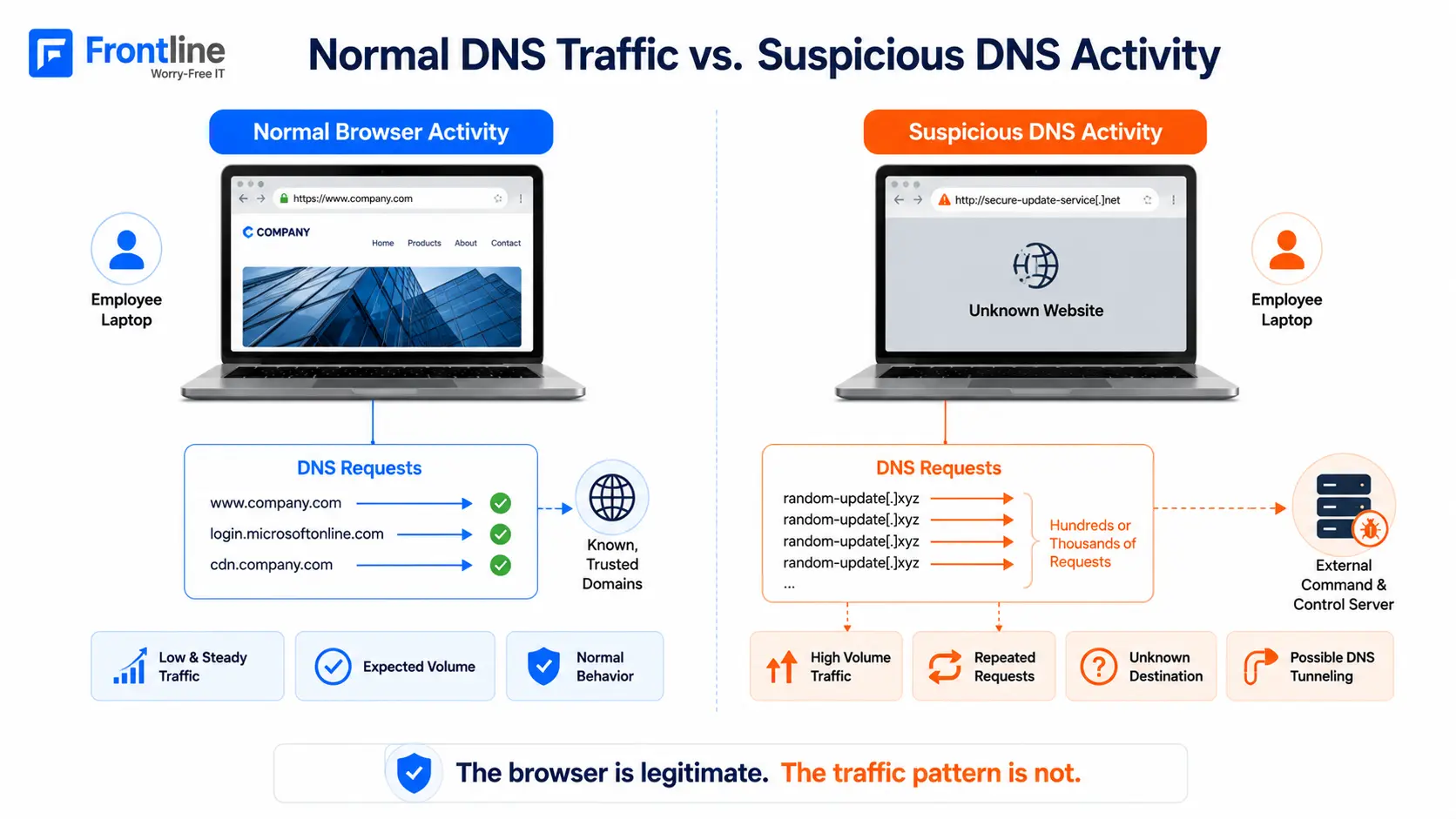
This pattern, sometimes called DNS tunneling or command-and-control communication, can indicate that a device is infected with malware. The browser is not the problem. It is being used as a communication channel back to an attacker’s server.
Why traditional security misses it: The browser file itself is legitimate. There is no malware signature to match. DNS-level monitoring and behavioral analysis surface this activity, not antivirus.
3. Network Scanning Tools Running on Employee Devices
Advanced IP Scanner and similar network-mapping utilities are legitimate tools that IT professionals use to track connected devices. When they appear under end-user accounts, at odd hours, or in high volumes, they become a serious warning sign.
Once attackers gain access to a device, they do not typically move immediately to encryption or data theft. First, they scan the environment and identify servers, shared drives, backup systems, and other connected devices. This stage can last days or weeks before any visible damage appears.
What the Data Shows
Systeminfo.exe and Advanced IP Scanner flags appear consistently across our client environments, with nearly 500 alerts over 180 days. These are legitimate IT tools running in the wrong place, at the wrong time, or under the wrong account.
By the time you see a ransom note, the attacker may already have full visibility and access into your network. Detecting this reconnaissance phase early is what makes the difference. Proper network monitoring and support can help identify abnormal discovery activity before it escalates.
Why traditional security misses it: These are trusted tools. The signal is the context: who ran the tool, when it ran, under what account, and how the volume compares with normal activity.
4. Scheduled Tasks and Registry Changes Appearing Without a Request
Malware that gets installed once does not want to disappear after the next reboot. To survive restarts, attackers create persistence mechanisms. They schedule tasks that relaunch malware, add registry entries that execute code at startup, or install new services that run quietly in the background.
Most of these changes happen silently, and most businesses have no practical way to notice them without continuous monitoring.
Persistence in Our Data
Schtasks.exe, Windows’ task scheduler, generated more than 157 rule-violation alerts over 180 days. Autostart anomalies and registry modification alerts show a consistent pattern of persistence activity across client networks.
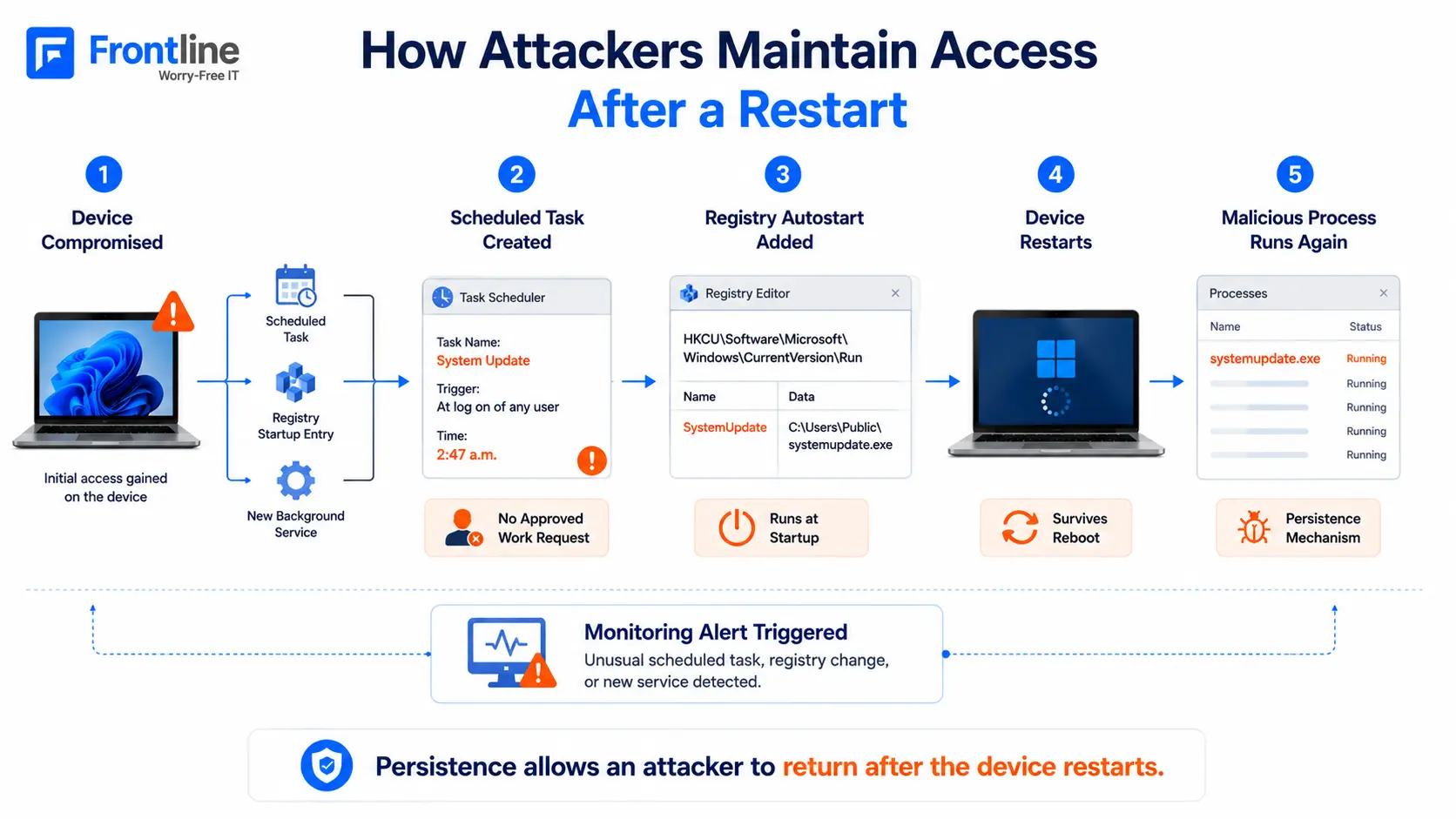
For example, a new scheduled task created at 2:47 a.m. by a process with no documented business purpose is a significant red flag. A new autostart entry should not appear without explanation.
Monitoring these changes in real time and generating alerts when something unexpected appears is a fundamental part of what proactive cybersecurity solutions provide. Without that visibility, persistence mechanisms can remain undetected for months.
Why traditional security misses it: Scheduled tasks and registry entries are legitimate operating-system features. Creating them is not inherently malicious. Context is everything, and antivirus has no context engine.
5. Remote Access Tools Installed Outside of IT Channels
Remote access tools such as VNC, ScreenConnect, and similar utilities are commonly used by managed IT providers to support clients. When they are installed by someone outside your IT team, they become a serious threat.
Attackers with administrative access often install their own remote access tools as a backup. Even if the original breach is cleaned up, that access can remain.
What We’re Seeing
Unauthorized WinVNC installations have been flagged across our client base. Remote access tools are appearing on devices with no corresponding work order, no documented deployment, and no one in IT who knows how they got there.
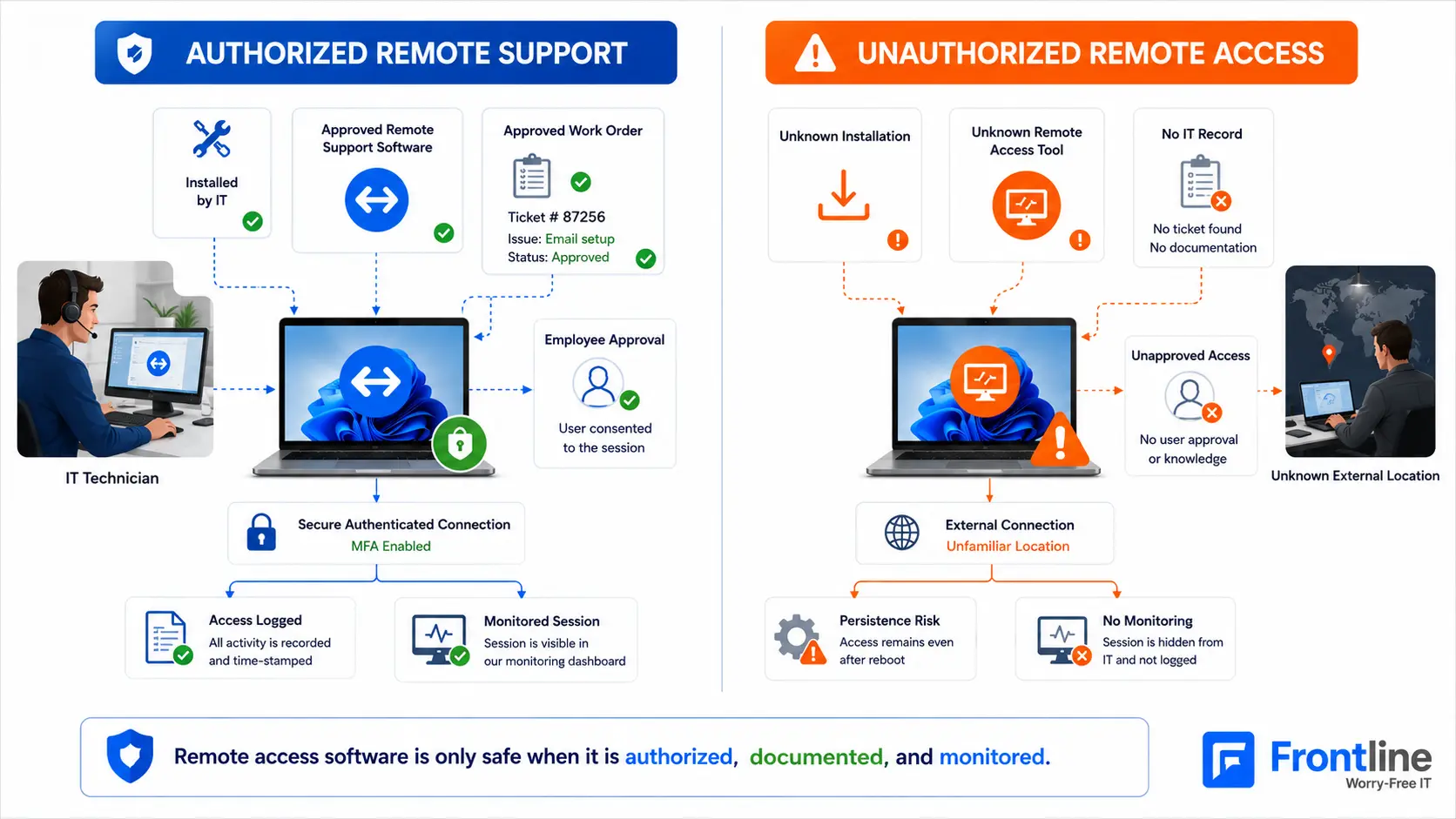
The key question is not simply whether remote access software is present. It is whether your IT team installed it for a documented purpose with proper approval and records. If not, it is worth investigating.
Why traditional security misses it: VNC and similar tools are not malware. They are trusted remote access applications, which is exactly why attackers use them. Inventory-based detection and unauthorized-change alerts catch this activity, while antivirus often does not.
The Common Thread
All five threat patterns share one characteristic: they do not look alarming on the surface. A PowerShell script, a DNS request, a scheduled task, a network scan, or a remote access tool can all be completely normal on their own.
The signal is in the context: who ran it, when it ran, which process started it, and whether it matches documented activity.
This contextual analysis is also what is missing when antivirus alone isn’t enough to protect your business, or when no one is actively reviewing the alerts generated by monitoring tools. Managed cybersecurity services fill these gaps by providing continuous monitoring, investigation, threat detection, and installing a properly configured firewall for your small business.
The Core Principle
Antivirus checks the bag. EDR watches the behavior.
That is the difference between catching these threats and missing them entirely.
See What’s Happening Inside Your Network
A 30-minute consultation can help you understand your current exposure, identify monitoring gaps, and determine what it would take to improve your security.
FT
About the author