Microsoft 365 is one of the most widely used software platforms, providing productivity, collaboration, and security tools that improve workflows. However, because it handles large volumes of sensitive data, it has also become a prime target for phishing attacks.
In this blog, we will show the most common Microsoft phishing scam examples, how to recognize them, and how to protect your business from future phishing compromises.
Why Microsoft Phishing Emails Are Increasing
As organizations rely on Microsoft 365, Outlook, OneDrive, and Teams, they become easy targets for hackers. They use sophisticated techniques and AI tools that help bypass security protection layers.
Microsoft emails are cybercriminals’ favorites because they hold sensitive information, including financial reports, banking reports, login credentials, and access to many tools the organization uses. A single compromised Microsoft email account can give scammers access to each of these documents, including entry to connected third-party applications.
Exploiting this trusted information can damage the business, leading to financial fraud, loss of trust and reputation, as well as ransomware incidents across the entire organization.
How to Spot These Red Flags
Before looking at the most common phishing attacks, let’s first review the typical red flags that can help you recognize fake emails.
Fake Domain
Look for spelling errors or misleading domains, such as micosoft.com or secure-microsoft-login.com.
Suspicious Sender Email
Check for misspellings, extra characters, or an address that does not match the organization.
Threatening Message
Be cautious of warnings about unusual sign-ins, security breaches, or immediate account closure.
Generic Greetings
Messages may use “Dear user” instead of your full name, department, or role.
Fake Microsoft Branding
Look for an outdated logo, unusual spacing, or layouts that differ slightly from genuine emails.
Teams or OneDrive Notifications
Be suspicious of unexpected requests to open or access shared files.
MFA Code Requests
Unexpected authentication requests may indicate that someone is trying to access your account.
There are various phishing scams that attackers use, and many look almost identical to original Microsoft emails. However, if you look closely before clicking a suspicious link or attachment, you may notice patterns that indicate a phishing attack.
11 Microsoft Phishing Email Examples Targeting Businesses in 2026
To understand how to protect against phishing attacks, you first need to recognize what fake Microsoft phishing emails look like. Here are the most common examples.
1
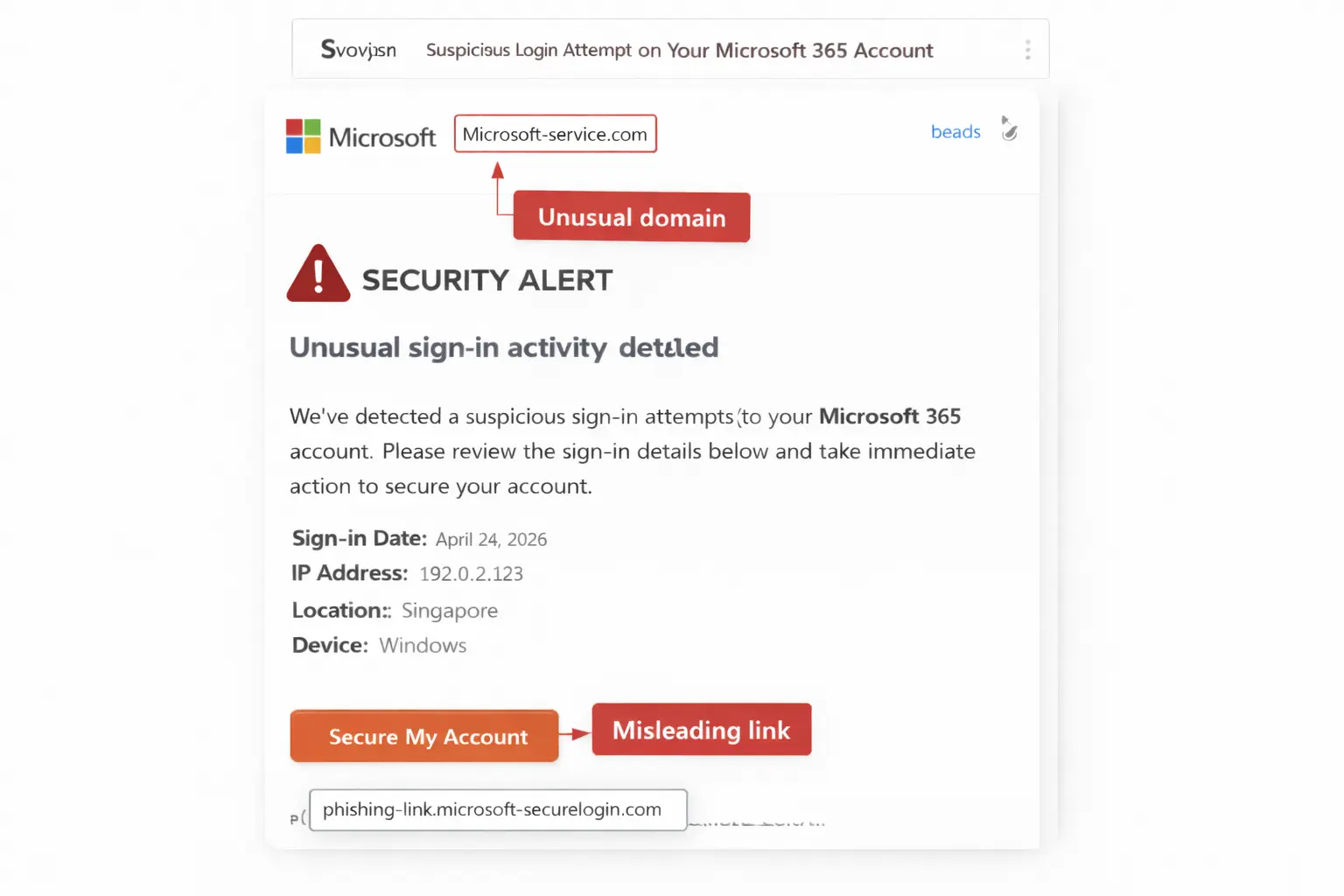
Microsoft Security Alert
Microsoft security alerts are among the most convincing phishing scams. They work on emotion by making the user fear that someone else has accessed their account. This pressure encourages recipients to react quickly and click a link.
How do they look?
They look similar to a real Microsoft alert sent when someone accesses your account. They use similar design, layout, branding, and language to imitate an authentic Microsoft notification.
Subject line examples
“Unusual Sign-In Activity Detected – Immediate Action Required!”
“Security Alert: Suspicious Login Attempt on Your Microsoft 365 Account”
What does it do?
It creates panic and pressures the user to confirm their identity or change their password using an action button.
Common red flags
- Unusual domains such as Microsoft-service.com
- Misleading link text that leads to a non-Microsoft URL
2
Fake Microsoft 365 Purchase
These Microsoft phishing emails include messages about expensive orders or purchases that do not exist. They are designed to make users click a malicious link so attackers can steal their credentials.
How do they look?
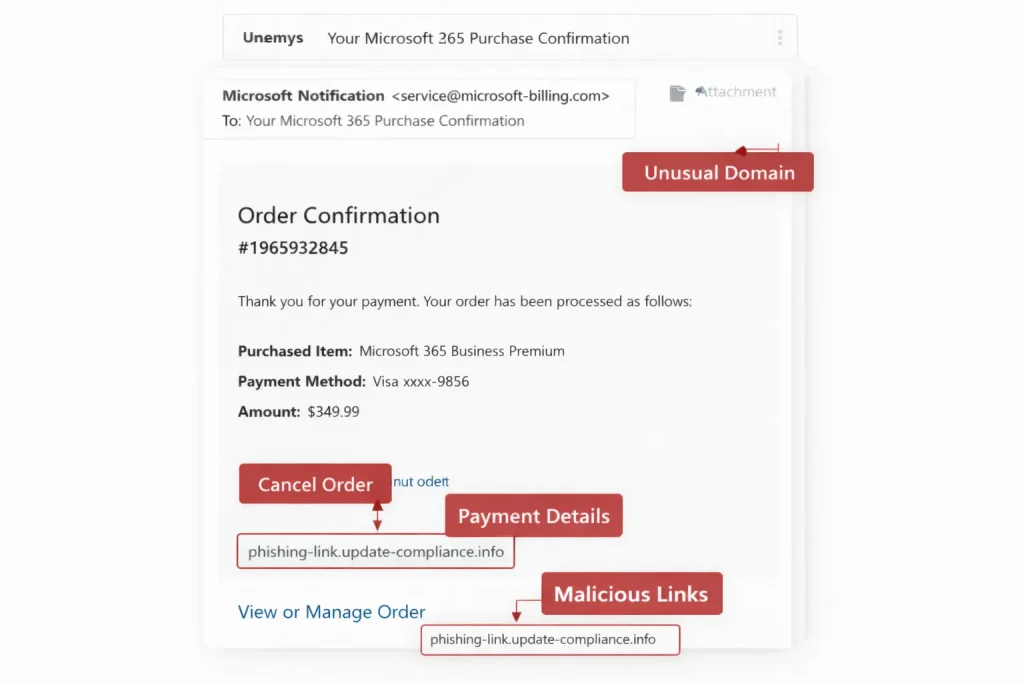
The message includes fake billing details and pressures the user to click a link to cancel or continue a charge or subscription. It may include an order ID and masked card details, making it look like a genuine Microsoft 365 purchase confirmation.
Subject line examples
“Your Microsoft 365 Purchase Confirmation”
“Invoice for Microsoft Subscription – View or Pay Now”
What does it do?
Attackers embed a malicious link or file into what appears to be a real Microsoft notification. The user feels pressured to download the attachment or click the link, initiating credential theft.
Common red flags
- Requests to verify, confirm, or update payment details
- Invoice attachments in PDF, ZIP, or HTML format
3
Microsoft File-Sharing Alerts
Microsoft OneDrive is a core file-sharing product used by many organizations. When a user shares a file through OneDrive, the recipient receives an email notification, creating an effective opportunity for scammers.
How do they look?
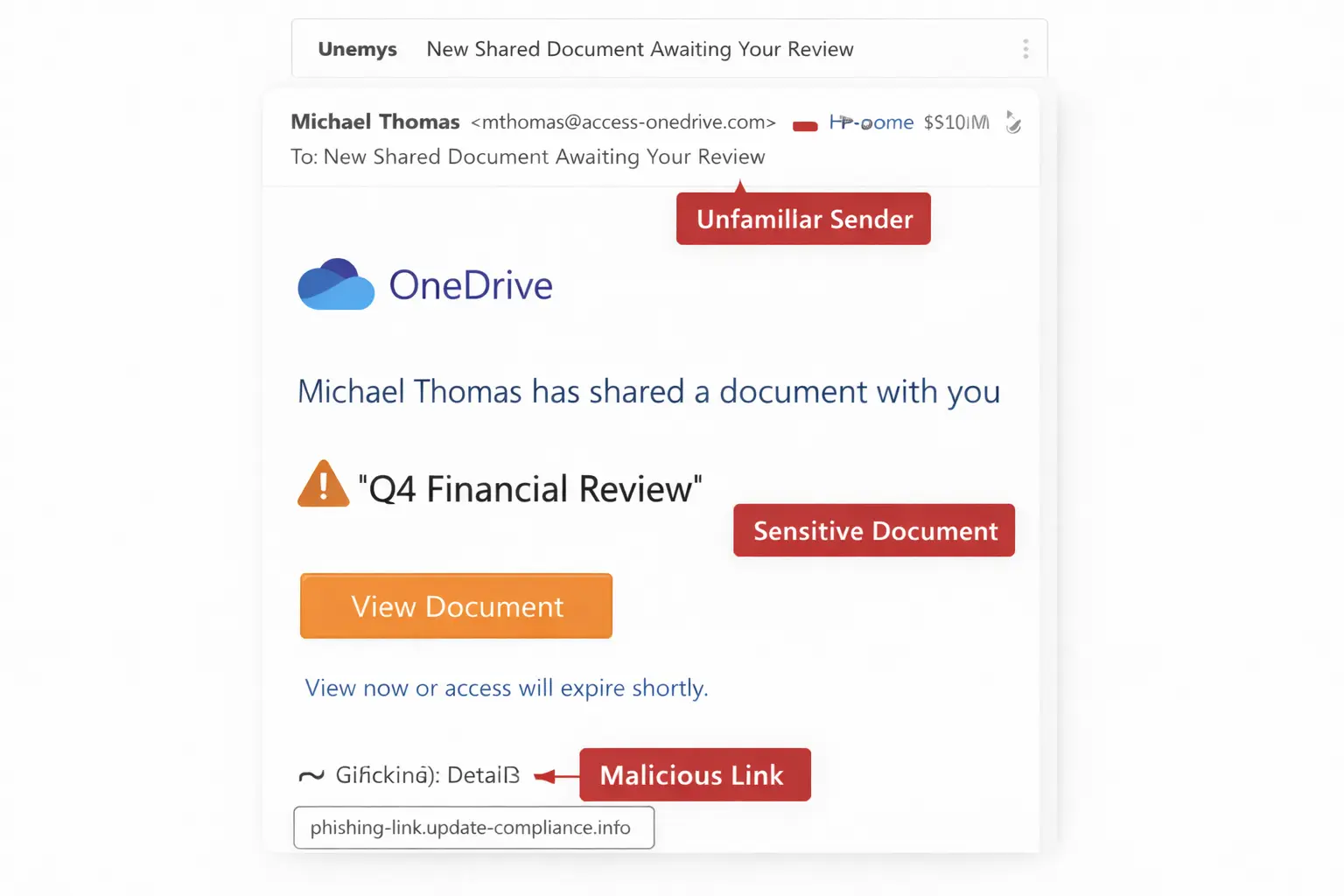
The email looks similar to a legitimate OneDrive, SharePoint, or Microsoft file-sharing notification. It tells the recipient that a document has been shared or requires review.
Subject line examples
“New Shared Document Awaiting Your Review”
“Your File Requires Permission – Microsoft SharePoint”
What does it do?
The phishing email urges the recipient to click a link to view a shared document. The link leads to a fake login or file-access page.
Common red flags
- An unfamiliar sender using a name similar to a colleague or partner
- Sensitive-sounding files such as “Employee Performance Reports” or “Q4 Financial Review”
- Pressure tactics such as “View now or access will expire”
4
SSO or Identity Provider Phishing
These attacks target centralized employee login credentials. A compromised single sign-on account may give an attacker access to multiple corporate applications.
How do they look?
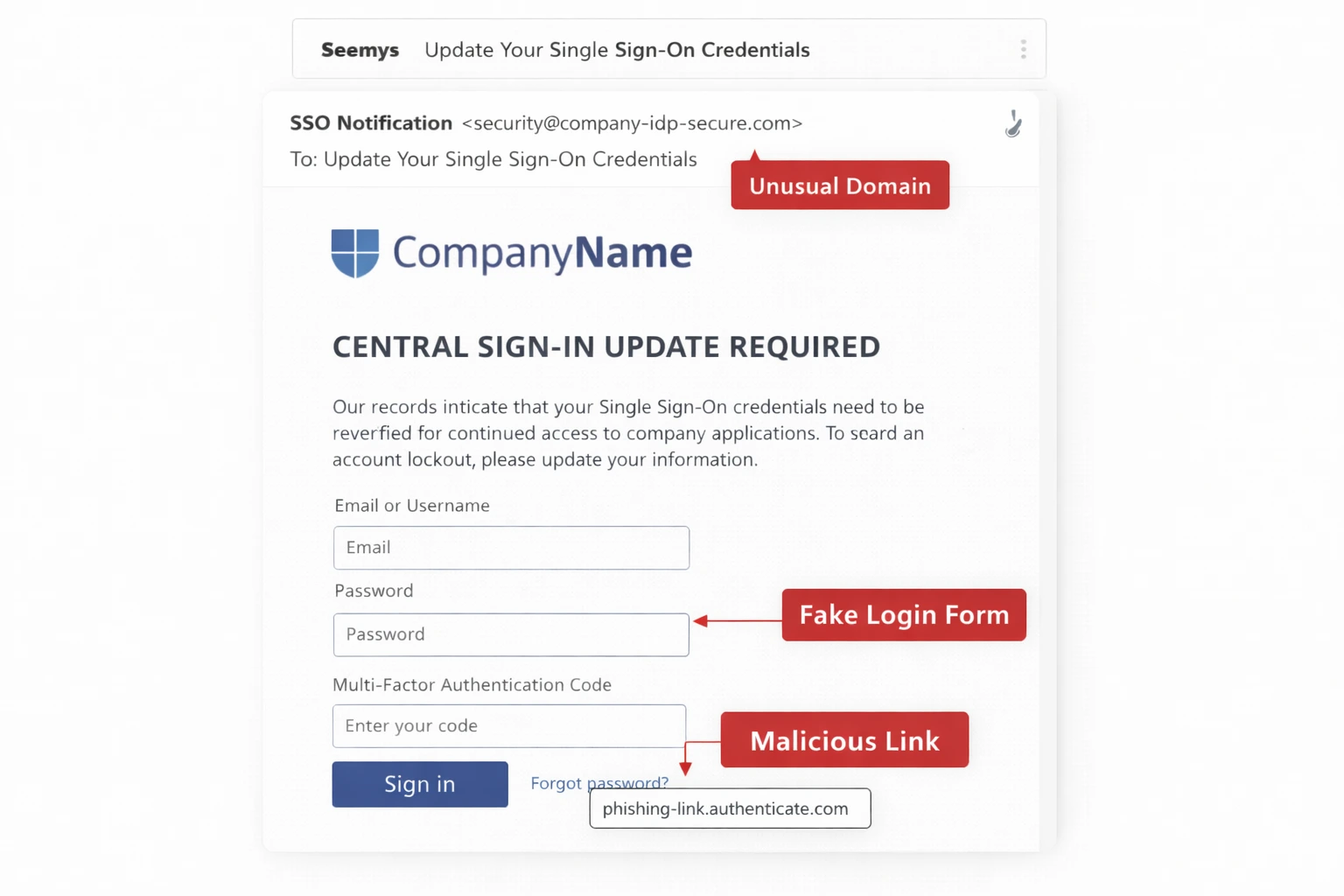
Attackers create fake identity provider login pages that closely resemble the organization’s real sign-in portal.
Subject line examples
“Your Microsoft 365 Account Will Be Locked”
“Update Your Single Sign-On Credentials”
What does it do?
The email tricks users into providing usernames, passwords, or MFA codes through a fake login page or malicious link.
Common red flags
- Requests for two-factor or multi-factor authentication codes by email
- Small differences in logos, colors, or font styles
- A sender address that does not match the identity provider’s domain
5
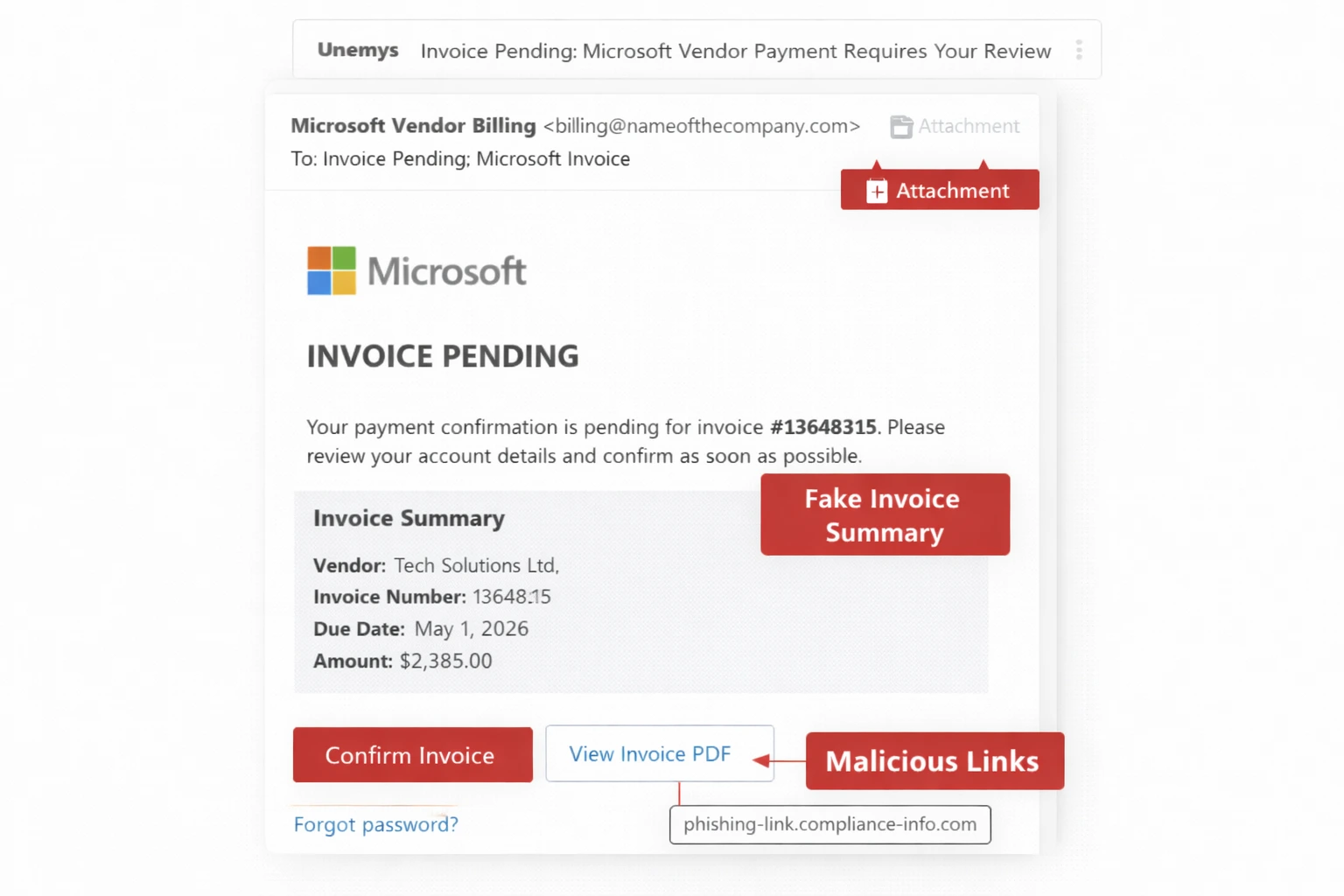
Fake Vendor Invoices
Fake invoices are designed to trick businesses into paying for non-existent services or redirect payments for real services into fraudulent accounts.
How do they look?
They look like legitimate Microsoft vendor invoice notifications and imitate the design, language, and layout of genuine billing alerts.
Subject line examples
“Invoice Pending: Microsoft Vendor Payment Requires Your Review”
“Microsoft 365 Billing Notification: Confirm Your Account Details”
What does it do?
The message pressures the recipient to confirm an order, review an invoice, or open an attachment. The urgency is designed to bypass normal payment-verification processes.
Common red flags
- Look-alike domains containing small spelling differences
- Minor spelling errors in the vendor email
- Generic email addresses or missing tax information
6
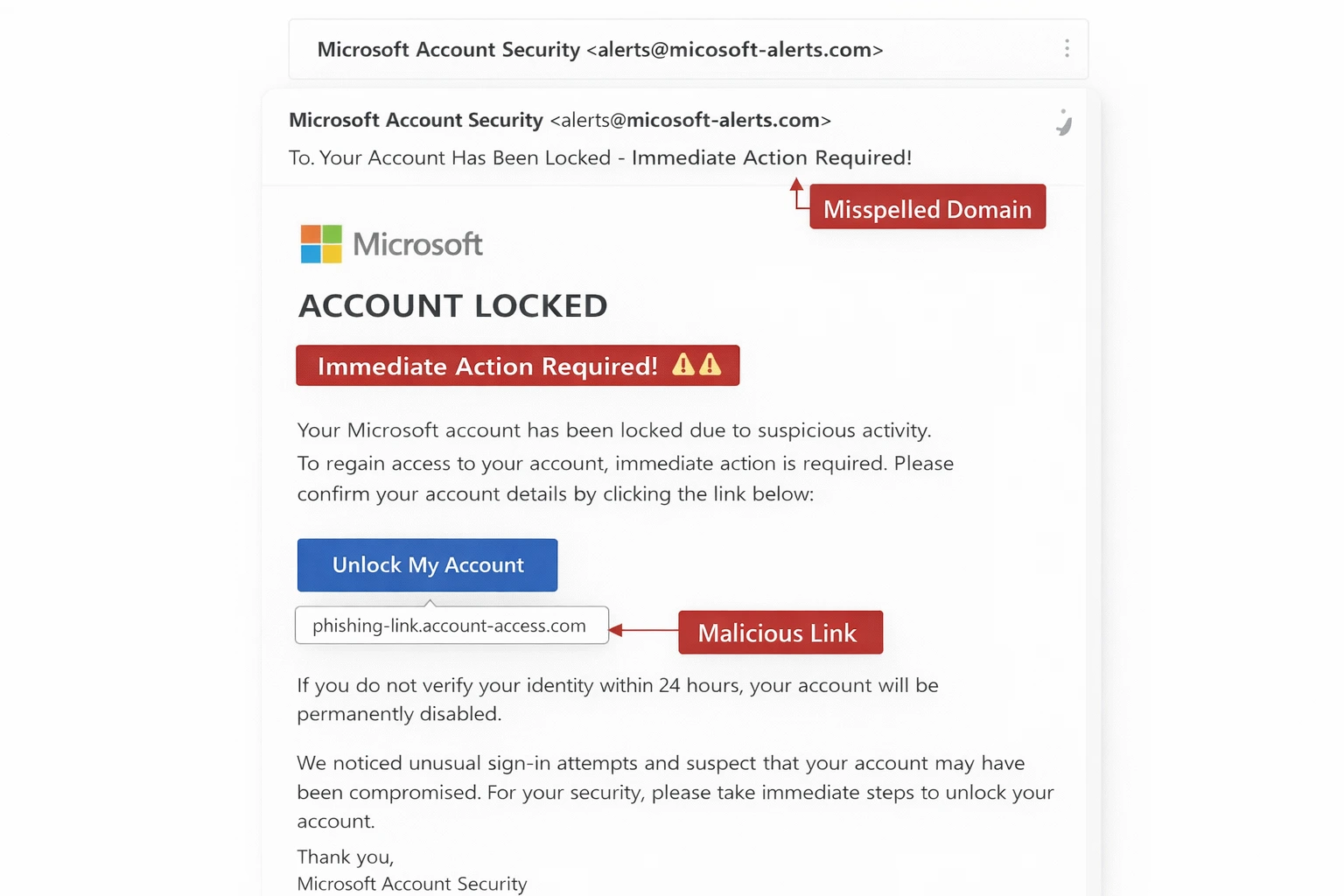
Account Lock or Update Required Scam
This common phishing email attempts to steal personal information or install malware. Microsoft does not send unsolicited messages asking users to call a phone number, provide remote access, or make a payment to fix a computer.
How do they look?
The messages use alarming language designed to make recipients act quickly without thinking. They may also contain spelling errors or misleading domains.
Subject line examples
“Your Account Has Been Locked – Reset Password Now”
“Update Your Credentials to Avoid Service Disruption”
What does it do?
It creates fear by threatening loss of access and directs the recipient to a fake password-reset or login page.
Common red flags
- Alarming language such as “Immediate action required”
- Unexpected lock notifications for accounts you did not access or manage
7
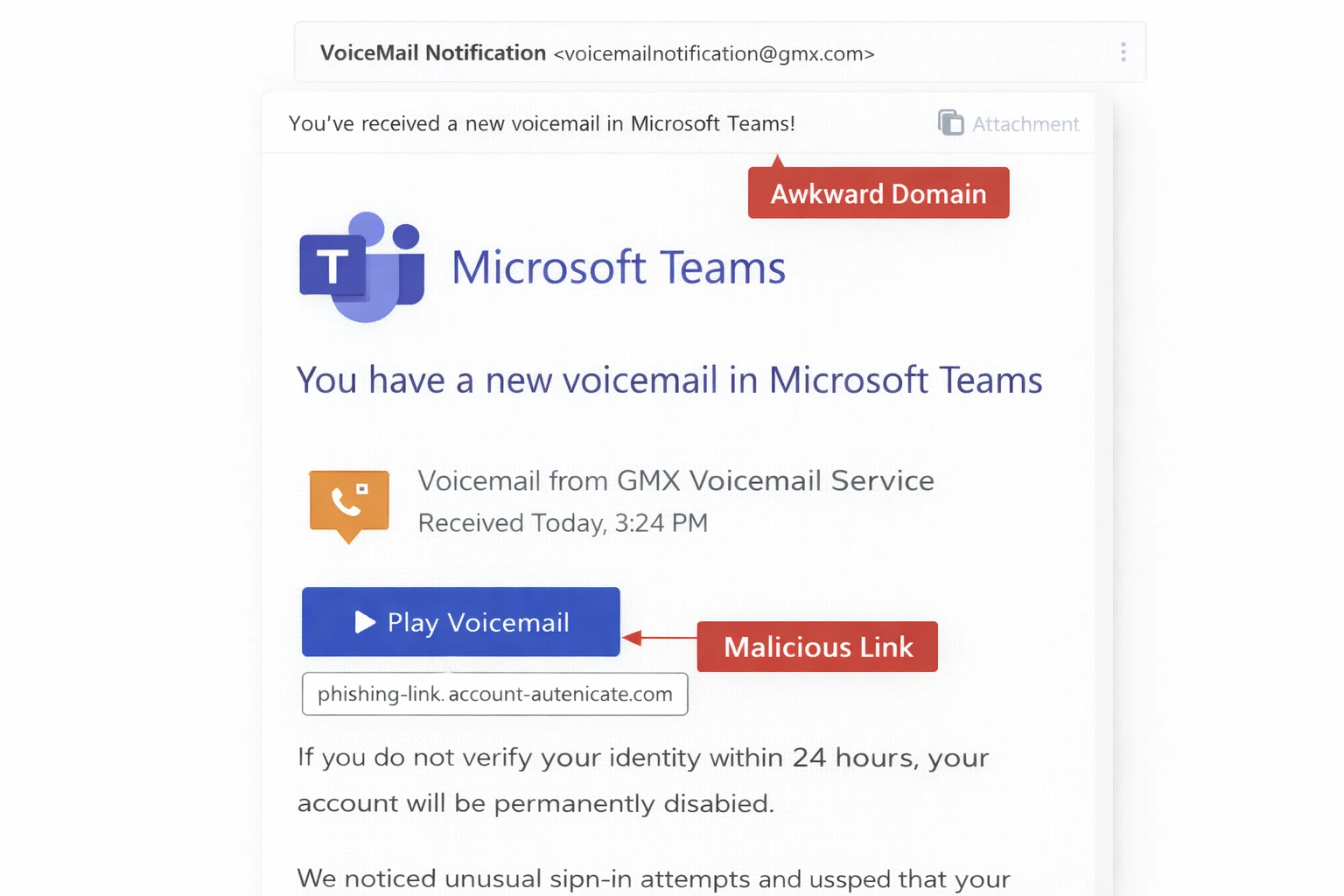
Microsoft Teams Voice Message
Microsoft Teams voicemail scams are designed to look like legitimate notifications. They direct users to fake sign-in pages that steal account credentials.
How do they look?
They may appear as genuine Microsoft Teams notifications saying that the recipient has a new voicemail. Some include files with names such as audio.mp3 or mth.mp3.
Subject line examples
“You’ve Received a New Voicemail in Microsoft Teams!”
“Missed Call Notification”
“New Voicemail – Listen Now”
What does it do?
The message includes a button such as “Play Voicemail” or “Listen Now.” Clicking it may take the user to a fake Microsoft login page.
Common red flags
- External sender addresses from unrelated domains
- Short or vague messages encouraging an immediate click
- A notification that appears even though no voicemail exists
8
Microsoft Defender Quarantine Scam
A fake Microsoft Defender quarantine message is a phishing or tech-support scam designed to trick the user into giving attackers money, information, or remote access.
How do they look?
These scams may appear as pop-ups or emails claiming that the computer is infected. They may tell the user to call a support number. Legitimate quarantine notifications may come from quarantine@messaging.microsoft.com and direct users to an official Microsoft portal.
Subject line examples
“Your Email Account Is at Risk – Click Here to Fix It”
“Microsoft Defender Alert: Suspicious File Quarantined”
What does it do?
The scam pretends to be a Microsoft Defender warning and pressures the recipient to click a fake link or contact fraudulent technical support.
Common red flags
- Pop-up warnings that display phone numbers
- Requests to call support immediately or allow remote access
9
Microsoft Azure Admin Alert
Microsoft Azure scams may mention account problems, subscription issues, unusual activity, security alerts, or pending updates.
How do they look?
They imitate genuine Microsoft Azure administrative alerts and include buttons or links designed to make the recipient take action.
Subject line examples
“Microsoft Azure Admin Alert: Suspicious Sign-In Detected”
“Action Required: Azure Subscription Needs Verification”
What does it do?
When recipients click a malicious button or link, attackers may steal administrator credentials and gain access to Azure services, cloud resources, databases, and storage.
Common red flags
- Look-alike domains such as microsoft-azure.com
- Unexpected subscription or administrator verification requests
10
Microsoft AI Usage Policy Update Scam
This scam is designed to trick users into revealing credentials or installing malicious software by posing as an urgent Microsoft AI policy update.
How do they look?
The emails appear to be official Microsoft communications about AI usage policies. They may include buttons or links claiming to provide required documentation.
Subject line examples
“Important: New AI Compliance Rules for Microsoft 365”
“Your Copilot Access Will Be Limited – Review Policy”
What does it do?
After clicking, users may be directed to pages that steal usernames and passwords, install malware, or provide access to data stored in Microsoft services.
Common red flags
- Policy acceptance requested through an external domain
- Vague language about “AI compliance issues”
11
OAuth App Consent Phishing
This is a sophisticated phishing attack in which scammers trick users into granting a malicious third-party application access to their Microsoft account.
How do they look?
The message claims that a new application requires access to a Microsoft 365 or Azure account. It may request permissions to read emails, access files, or manage account data. Because the consent page may be hosted by Microsoft, the attack can be difficult to recognize.
Subject line examples
“Microsoft 365 App Consent Needed to Continue”
“Security Alert: Third-Party App Access Pending Approval”
What does it do?
The attack uses the user’s existing authenticated session, making MFA less relevant to the consent-token theft. It also relies on trusted Microsoft consent pages, making the request appear legitimate.
Common red flags
- Vague application names such as “Microsoft Secure App” or “Productivity Tool”
- Unexpected permission requests when you did not install or request a new application
How Businesses Can Protect Against Microsoft Phishing in 2026
As Microsoft phishing email attacks increase, businesses need a proactive approach that adds multiple layers of security. Organizations need strong security controls rather than relying on a single solution.
Many organizations address this by working with cybersecurity services that combine email protection, identity controls, monitoring, and response under one managed program.
Employee Phishing Awareness Training
Regular training helps employees recognize common Microsoft phishing emails. Real-world examples teach staff how to distinguish fake messages from legitimate ones and respond quickly.
Multi-Factor Authentication
An extra verification step, like MFA, makes it harder for attackers to access Microsoft 365, Azure, and other cloud services, especially when paired with stronger login protection with multi factor steps.
Email Security and Anti-Phishing Tools
Advanced email security tools help detect and block phishing emails before they reach employee inboxes.
Conditional Access Policies
Conditional access policies control how and when users can access Microsoft services. Rules based on location, device security, and risk can block suspicious logins and reduce the damage caused by stolen credentials.
Regular Security Audits
Routine audits identify weaknesses before attackers exploit them and help ensure that security policies remain effective as threats evolve.
An effective security plan also requires a fast response to phishing attacks. When properly implemented across an organization, it can minimize damage and prevent further compromise.
How to Stay Aware and Secure From Phishing Scams
Staying protected from Microsoft phishing scams requires a combination of advanced security tools, employee awareness, and continuous monitoring.
There are many Microsoft phishing email examples businesses need to recognize and address proactively. AI-powered tools can strengthen email security by analyzing slightly different logos, images, language, attachments, and login pages.
Ongoing phishing training is essential to ensure these security measures are used effectively and to keep organizations protected against evolving phishing scams.
A 30-minute consultation can help you understand your current exposure, identify monitoring gaps, and determine what it would take to improve your security.
FT
About the author